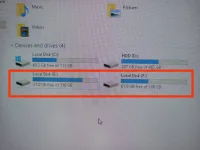
Hello! I can help you with that. It seems like your SSD is retaining its data even after you try to delete or format it. This can happen if the data is being stored in a hidden partition or if there are issues with the disk itself.
Since you've already tried DiskPart and the data is still persisting, here are a few steps you can try:
1. Use Disk Management:
- Right-click on "This PC" or "My Computer" and select "Manage."
- Go to "Disk Management" under "Storage" and locate your SSD.
- Right-click on the SSD and select "Format." Follow the on-screen instructions to format the drive.
2. Use a Third-Party Tool:
- You can try using third-party disk management tools like EaseUS Partition Master or MiniTool Partition Wizard to format the SSD completely.
3. Secure Erase:
- Some SSD manufacturers provide a tool for secure erasing the drive, which clears all data including hidden partitions. Check the manufacturer's website for such a tool.
4. Check for Firmware Updates:
- Sometimes updating the SSD's firmware can resolve issues with formatting and data persistence. Check the manufacturer's website for firmware updates.
5. Physically Disconnect and Reconnect:
- If all else fails, you can physically disconnect the SSD from the PC, restart the computer, and then reconnect the SSD. This may help in resetting any persistent data.
If none of these steps work, there might be an issue with the SSD itself. In that case, you may need to seek professional help or consider replacing the SSD. Let me know if you need further assistance or if you have any other questions.
 PH
PH