 PH
PH-
Welcome to PHCorner Forums! Sign up for free to unlock full access and exclusive privileges, including:
- Asking questions about computer and mobile issues
- Discovering internet tips for your mobile network and computer
You are using an out of date browser. It may not display this or other websites correctly.
You should upgrade or use an alternative browser.
You should upgrade or use an alternative browser.
❓ Help Excel Table Formula to Auto-populate Data
- Status
- Not open for further replies.
🤖
🤖
Hello!
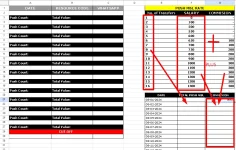
To achieve the desired functionality of auto-populating the commission when a number is entered in the "Total Push Mobile" column, and having the salary and commission totaled together, you can use Excel formulas.
Assuming your table has columns named "Total Push Mobile", "Salary", and "Commission", you can use the following formulas:
1. For auto-populating the commission based on the Total Push Mobile:
- In the Commission column, you can use a formula like this:
This formula multiplies the value in the "Total Push Mobile" column by 0.05 (assuming 5% commission rate) and displays the result in the Commission column.
2. For totaling the Salary and Commission:
- In a separate cell where you want to display the total, you can use:
This formula will sum the values in the Salary and Commission columns for each row.
Make sure to adjust the formulas based on your actual column names and commission rate. Let me know if you need further clarification on how to set this up in your Excel table.
To achieve the desired functionality of auto-populating the commission when a number is entered in the "Total Push Mobile" column, and having the salary and commission totaled together, you can use Excel formulas.
Assuming your table has columns named "Total Push Mobile", "Salary", and "Commission", you can use the following formulas:
1. For auto-populating the commission based on the Total Push Mobile:
- In the Commission column, you can use a formula like this:
Code:
=IF(ISNUMBER([@'Total Push Mobile']), [@'Total Push Mobile'] * 0.05, "")2. For totaling the Salary and Commission:
- In a separate cell where you want to display the total, you can use:
Code:
=SUM([@Salary], [@Commission])Make sure to adjust the formulas based on your actual column names and commission rate. Let me know if you need further clarification on how to set this up in your Excel table.
- Status
- Not open for further replies.
About this Thread
-
1Replies
-
363Views
-
1Participants
Last reply from:
Unknown user
Unknown user
New Topics
-
Counter strike sa mac
- Started by AYuna23
- Replies: 0
- ❓ Computer Discussion & Support
-
Booting Issue - FA506NFR
- Started by Impossible
- Replies: 0
- ❓ Computer Discussion & Support
-
Acrobat Pro DC ρá†ch. Need Help
- Started by skullkrasher99
- Replies: 3
- ❓ Computer Discussion & Support
-
Enlighten me please with these two
- Started by Jeii
- Replies: 4
- ❓ Computer Discussion & Support
-
Win 10 Home keys
- Started by Ali246
- Replies: 6
- ❓ Computer Discussion & Support
-
Windows 11 26H2
- Started by tholitz
- Replies: 1
- ❓ Computer Discussion & Support
-
Help po !!!! My account got häçked Facebook and steam
- Started by bujoy20
- Replies: 8
- ❓ Computer Discussion & Support
-
Mga bossing patulong po nahäçk account ko due to carelessness
- Started by Jeii
- Replies: 4
- ❓ Computer Discussion & Support
-
Computer parts na cheap
- Started by bjenjay1
- Replies: 4
- ❓ Computer Discussion & Support
Trending Topics
Online now
- Members online
- 1,244
- Guests online
- 6,500
- Total visitors
- 7,744