 PH
PHWinxvideo AI v3.1.0.0 (x64)

Table of Contents
- You do not have permission to view the full content of this post.
Log in or register now.
- You do not have permission to view the full content of this post. Log in or register now.
- You do not have permission to view the full content of this post. Log in or register now.
- You do not have permission to view the full content of this post. Log in or register now.
- You do not have permission to view the full content of this post. Log in or register now.
- You do not have permission to view the full content of this post. Log in or register now.
- You do not have permission to view the full content of this post. Log in or register now.
- You do not have permission to view the full content of this post. Log in or register now.
- You do not have permission to view the full content of this post. Log in or register now.
Winxvideo AI Overview
Winxvideo AI Your complete toolkit powered by AI. Enhance video/image, whether it’s old, low-quality, noisy, or blurry. Upscale, stabilize, convert, compress, record, and edit 4K/8K/HDR videos smoothly and efficiently, achieving cinema-grade visuals in every frame.
Key Features of Winxvideo AI
- Enhance Video and Image to Cinema-grade Quality
Harness CineAI to upscale video/image, stabilize video, & boost FPS. - Elevate Camera Recordings
– Stabilize handheld shots
– Minimize camera shake
– Create Slo-mo
– Remove motion blur - Restore Old Footages
Revitalize classic MVs, low-pixel home recordings, & videos from VHS/DVD/mini DV.
– 480P to 1080P/4K
– 24fps to 60fps
– Restore video/image
– Up to 4X upscaling - Improve Low-Quality Videos
– Blurry
– Noisy
– Blocky
– Interlaced
– Heavily Compressed - Enhance AI-generated Image
– To 4K/8K/10K
– Batch process
– GPU-accelerated - Convert & Compress 4K/8K/HDR Video – Full GPU Acceleration
Bid farewell to format compatibility struggles and hefty file sizes. Winxvideo AI takes care of all your audio/video conversion needs and compresses your 4K/8K footage from GBs to MBs without compromising quality, backed by full GPU acceleration. Whether playing local files on mobile/PC, transforming GoPro adventures into compact wonders, or sharing cherished memories across social platforms, Winxvideo AI has you covered. - Unleash Your Creativity with Screen Recorder & Video Editor
- Edit/Cut Video to Craft Perfect Story
Craft compelling stories with the video editor. Trim video down to the essence, split video into shorter clips for faster sharing, remove distractions, & highlight the best moments to captivate the audience. - Record Screen at Will
Record full/custom screen, webcam, picture-in-picture, audio, and highlight important area at will. Whether you want to play games, deliver presentations, take online courses, save video calls, create demos, or host online meetings, Winxvideo AI addresses your needs.
Winxvideo AI System Requirements
Below are the minimum system requirements for running the Winxvideo AI
| Processor: | Intel Pentium 4 or later. |
| RAM: | 2 GB available memory. |
| Windows: | 11, 10, 8.1/8, 7. |
| Space: | 500 MB available space. |
Winxvideo AI Changelog
Below is the list of changes made to the current version of Winxvideo AI.
- Official site does not provide any info about changes in this version
Winxvideo AI Screenshots
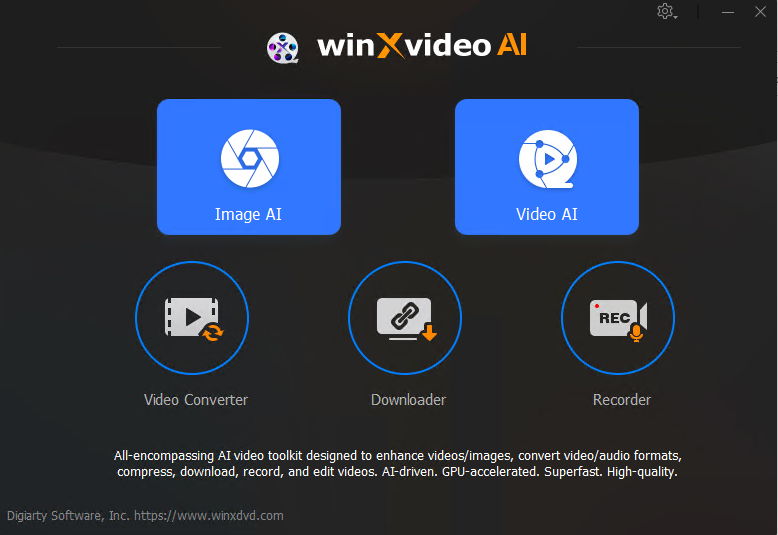

How to use Winxvideo AI?
Follow the below instructions to activate your version of Winxvideo AI.
- Unpack setup from archive and disable internet
- Install using given installer (preactivated)
- That’s it, Enjoy!
Winxvideo AI Details
Below are the details about Winxvideo AI. Virustotal results are attached within the table for both the installer and the crack.
| App Size: | 200.6 MB |
| Setup Status: | Untouched |
| Virustotal Results: | You do not have permission to view the full content of this post. Log in or register now. / You do not have permission to view the full content of this post. Log in or register now. |
Winxvideo AI Download Links
You do not have permission to view the full content of this post. Log in or register now. | You do not have permission to view the full content of this post. Log in or register now. | You do not have permission to view the full content of this post. Log in or register now.
