 PH
PHPHC-jollibee
Forum Veteran
Good evening, mga ka Jollibee. I am back with a newly cooked guide with assembly programming.
I assume you are reading this in DARK MODE. Sakit sa mata yung white background HAHAHA
Tools Needed
1. NASM
2. LINUX BOX
3. CODE EDITOR (VSCode, Vim, Nano) -> anything where you can write yung instructions because it does not require a fancy code editor.
A brief overview of assembly language:
Assembly Language is any You do not have permission to view the full content of this post. Log in or register now. with a very strong correspondence between the instructions in the language and the You do not have permission to view the full content of this post. Log in or register now. You do not have permission to view the full content of this post. Log in or register now. You do not have permission to view the full content of this post. Log in or register now..
In other words, assembly language corresponds with machine code like binary code to execute a program, so programmers created assembly language to prevent writing 1's and 0's, which is a very tedious task and prone to error "human error".
You do not have permission to view the full content of this post. Log in or register now.
Here is a simple diagram of the evolution of programming languages
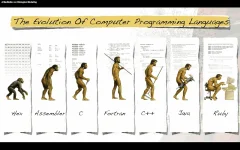
As you observe nowadays, usually sa mga baguhan, they most likely know PYTHON, JAVASCRIPT, RUST, and many more high-level languages which is good but to understand the inner functionality of your program, you NEED to learn Assembly Programming.
TUTORIAL TIME
So, ngayun let's dive into the basics of assembly language, and the architecture we will be using is NASM or Netwide Assembler. This will only work in a Linux box. If you want Windows as an OS, you can install Visual Studio and Irvine, which automatically install MASM (MASM is an alternative for NASM which is for Windows operating system siya). Now let's assume you have already installed those tools and you are ready to go.
In assembly, it uses mnemonic codes like mov, add, sub, div, and many more.
Example of Assembly Code
mov rax, 1
mov rdx, 2
add rax, rdx
ret
Explaination
You are moving the value 1 sa rax register (Registers will be discussed below)
tapos moving the value of 2 sa rdx na register
and lastly adding the value of rax and rdx and return the value
kung sa c++ or any languages you're just declaring 2 variables and adding their values, very simple.
Assembly also separates code into section.
1. .data - the purpose of this section is for declaring a constant value (Example: your helloword message)
2. .text - the purpose of this section is for keeping your actual code like _start which in _start duon mo ilalagay yung codes mo.
3. .bssi - the purpose of this section is for declaring a variables na initialized lang pero walang value
and many more sections (You can search on Google "Assembly Sections" for your reference)
NOTE: Walang issue kung paano ang sunod sunod nang section mo kase yung compiler na ang bahala mag fix niyan after compilng your code.
ASSEMBLY REGISTERS
The following registers mentioned are for only x64 architecture. You can refer to this website You do not have permission to view the full content of this post. Log in or register now.
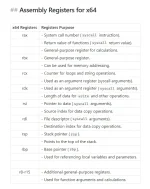
Now you have a little bit of understanding of how assembly code operates, lets create a hello world message using assembly
You can use this online editor You do not have permission to view the full content of this post. Log in or register now.
Pa react naman IDOLO para makuha mo yung code
section .data
msg db "Hello world!", 0 ; Our hello world message
msg_len equ $ - msg ; Getting our message length
section .text
global _start ; entry point of our program
_start:
mov rax, 1 ; sys_call(1) means lang nito is to start our program
mov rdi, 1 ; file descriptor 1
mov rsi, msg ; our actual message
mov rdx, msg_len ; message length
syscall ;invoke system call
mov rax, 60 ;sys-call(60) exit program
mov rdi, 0 ;file descriptor 0
syscall ;invoke the system call
CODE:
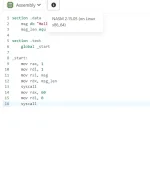
CLICK THE RUN BUTTON

RESULT:
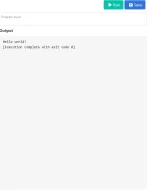
So you just learned the basics of ASSEMBLY Language don't forget to comment and critique the content if you have some suggestions comment below mga papi.
~adios
I assume you are reading this in DARK MODE. Sakit sa mata yung white background HAHAHA
Tools Needed
1. NASM
2. LINUX BOX
3. CODE EDITOR (VSCode, Vim, Nano) -> anything where you can write yung instructions because it does not require a fancy code editor.
A brief overview of assembly language:
Assembly Language is any You do not have permission to view the full content of this post. Log in or register now. with a very strong correspondence between the instructions in the language and the You do not have permission to view the full content of this post. Log in or register now. You do not have permission to view the full content of this post. Log in or register now. You do not have permission to view the full content of this post. Log in or register now..
In other words, assembly language corresponds with machine code like binary code to execute a program, so programmers created assembly language to prevent writing 1's and 0's, which is a very tedious task and prone to error "human error".
You do not have permission to view the full content of this post. Log in or register now.
Here is a simple diagram of the evolution of programming languages
As you observe nowadays, usually sa mga baguhan, they most likely know PYTHON, JAVASCRIPT, RUST, and many more high-level languages which is good but to understand the inner functionality of your program, you NEED to learn Assembly Programming.
TUTORIAL TIME
So, ngayun let's dive into the basics of assembly language, and the architecture we will be using is NASM or Netwide Assembler. This will only work in a Linux box. If you want Windows as an OS, you can install Visual Studio and Irvine, which automatically install MASM (MASM is an alternative for NASM which is for Windows operating system siya). Now let's assume you have already installed those tools and you are ready to go.
In assembly, it uses mnemonic codes like mov, add, sub, div, and many more.
Example of Assembly Code
mov rax, 1
mov rdx, 2
add rax, rdx
ret
Explaination
You are moving the value 1 sa rax register (Registers will be discussed below)
tapos moving the value of 2 sa rdx na register
and lastly adding the value of rax and rdx and return the value
kung sa c++ or any languages you're just declaring 2 variables and adding their values, very simple.
Assembly also separates code into section.
1. .data - the purpose of this section is for declaring a constant value (Example: your helloword message)
2. .text - the purpose of this section is for keeping your actual code like _start which in _start duon mo ilalagay yung codes mo.
3. .bssi - the purpose of this section is for declaring a variables na initialized lang pero walang value
and many more sections (You can search on Google "Assembly Sections" for your reference)
NOTE: Walang issue kung paano ang sunod sunod nang section mo kase yung compiler na ang bahala mag fix niyan after compilng your code.
ASSEMBLY REGISTERS
The following registers mentioned are for only x64 architecture. You can refer to this website You do not have permission to view the full content of this post. Log in or register now.
Now you have a little bit of understanding of how assembly code operates, lets create a hello world message using assembly
You can use this online editor You do not have permission to view the full content of this post. Log in or register now.
Pa react naman IDOLO para makuha mo yung code
section .data
msg db "Hello world!", 0 ; Our hello world message
msg_len equ $ - msg ; Getting our message length
section .text
global _start ; entry point of our program
_start:
mov rax, 1 ; sys_call(1) means lang nito is to start our program
mov rdi, 1 ; file descriptor 1
mov rsi, msg ; our actual message
mov rdx, msg_len ; message length
syscall ;invoke system call
mov rax, 60 ;sys-call(60) exit program
mov rdi, 0 ;file descriptor 0
syscall ;invoke the system call
CODE:
CLICK THE RUN BUTTON
RESULT:
So you just learned the basics of ASSEMBLY Language don't forget to comment and critique the content if you have some suggestions comment below mga papi.
~adios


