 PH
PHEver heard of rethink dns? May application para dito na nag su support ng zero delay between your router and your device. Pero, if you prefer using private dns ng phone mo, here's how :
1. Punta ka sa link nato : You do not have permission to view the full content of this post. Log in or register now.
2. Now, yung private dns ng device mo hindi nag su support ng DNS over HTTP (DoH) kaya e switch natin yan into DNS over TLS. E click mo lang yung DoH button.
From this :

To this :

3. Next, e configure na natin anong preferred settings mo para sa private dns mo. Tap mo lang yung three (3) dots na naka vertical sa gilid tas tap simple. (By default, naka advanced ito, if you prefer specific settings, you're free to do so).

4. Kung gusto mo ng walang adware at malware punta ka lang sa Security, and Privacy. E tick mo lang kung anong best settings para sayo.
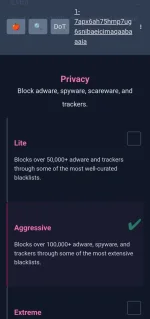
Warning : Wag masyadong e aggressive yung settings baka it may not load na for most apps.
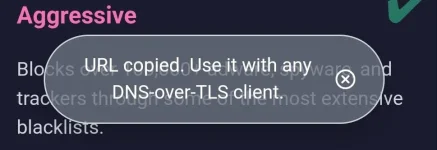
5. Copy the link generated above by tapping the url (example : 1-7apx6h )at may lalabas na ganito sa baba :
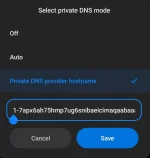
6. Lastly, e paste mo na yung copied link sa private dns na makikita mo sa settings ng device mo, and you're good to go.
For users na mas prefer yung may ads for rewards claiming ng mga certain apps. You're free to configure it on your own sa advanced settings. Maraming salamat.
1. Punta ka sa link nato : You do not have permission to view the full content of this post. Log in or register now.
2. Now, yung private dns ng device mo hindi nag su support ng DNS over HTTP (DoH) kaya e switch natin yan into DNS over TLS. E click mo lang yung DoH button.
From this :
To this :
3. Next, e configure na natin anong preferred settings mo para sa private dns mo. Tap mo lang yung three (3) dots na naka vertical sa gilid tas tap simple. (By default, naka advanced ito, if you prefer specific settings, you're free to do so).
4. Kung gusto mo ng walang adware at malware punta ka lang sa Security, and Privacy. E tick mo lang kung anong best settings para sayo.
Warning : Wag masyadong e aggressive yung settings baka it may not load na for most apps.
5. Copy the link generated above by tapping the url (example : 1-7apx6h )at may lalabas na ganito sa baba :
6. Lastly, e paste mo na yung copied link sa private dns na makikita mo sa settings ng device mo, and you're good to go.
For users na mas prefer yung may ads for rewards claiming ng mga certain apps. You're free to configure it on your own sa advanced settings. Maraming salamat.


