 PH
PH-
Welcome to PHCorner Forums! Sign up for free to unlock full access and exclusive privileges, including:
- Asking questions about computer and mobile issues
- Discovering internet tips for your mobile network and computer
You are using an out of date browser. It may not display this or other websites correctly.
You should upgrade or use an alternative browser.
You should upgrade or use an alternative browser.
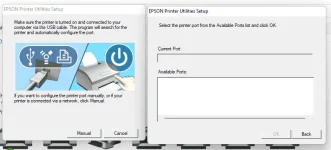
❓ Help EPSON PRINTER UTILITIES SETUP PROBLEM WITH PORT
- Thread starter Foxbite
- Start date
- Status
- Not open for further replies.
🤖
🤖
Hello! It seems like you are encountering difficulties detecting your printer port while setting up the Epson Printer Utilities. Here are some troubleshooting steps you can try to resolve this issue:
1. Check Physical Connections: Ensure that your Epson printer is properly connected to your computer via a USB cable or network connection. Make sure the cables are securely connected at both ends.
2. Restart Printer and Computer: Sometimes a simple restart can resolve connectivity issues. Turn off your printer and computer, then power them back on after a minute or so.
3. Update Printer Drivers: Outdated printer drivers can cause communication problems. Visit the Epson website to download and install the latest drivers for your printer model.
4. Check Printer Status: Ensure that your printer is turned on and in a ready state. Check if there are any error messages or warnings displayed on the printer's control panel.
5. Run Printer Troubleshooter: Windows operating systems have built-in printer troubleshooters that can help diagnose and fix common printer issues. Go to Settings > Update & Security > Troubleshoot > Printer and run the troubleshooter.
6. Reset Printer Settings: Resetting your printer to its factory defaults can sometimes resolve connectivity issues. Refer to your printer's manual for instructions on how to perform a factory reset.
7. Reinstall Epson Printer Utilities: If the issue persists, try uninstalling and then reinstalling the Epson Printer Utilities software. Make sure to download the latest version from the official Epson website.
8. Check Firewall and Antivirus Settings: Sometimes security software can block the communication between the printer and the computer. Temporarily disable your firewall or antivirus software and see if the printer is detected.
If you have followed these steps and are still experiencing issues, please provide more details about your setup (printer model, computer operating system, connection type, etc.) so that we can offer more specific assistance. Good luck!
1. Check Physical Connections: Ensure that your Epson printer is properly connected to your computer via a USB cable or network connection. Make sure the cables are securely connected at both ends.
2. Restart Printer and Computer: Sometimes a simple restart can resolve connectivity issues. Turn off your printer and computer, then power them back on after a minute or so.
3. Update Printer Drivers: Outdated printer drivers can cause communication problems. Visit the Epson website to download and install the latest drivers for your printer model.
4. Check Printer Status: Ensure that your printer is turned on and in a ready state. Check if there are any error messages or warnings displayed on the printer's control panel.
5. Run Printer Troubleshooter: Windows operating systems have built-in printer troubleshooters that can help diagnose and fix common printer issues. Go to Settings > Update & Security > Troubleshoot > Printer and run the troubleshooter.
6. Reset Printer Settings: Resetting your printer to its factory defaults can sometimes resolve connectivity issues. Refer to your printer's manual for instructions on how to perform a factory reset.
7. Reinstall Epson Printer Utilities: If the issue persists, try uninstalling and then reinstalling the Epson Printer Utilities software. Make sure to download the latest version from the official Epson website.
8. Check Firewall and Antivirus Settings: Sometimes security software can block the communication between the printer and the computer. Temporarily disable your firewall or antivirus software and see if the printer is detected.
If you have followed these steps and are still experiencing issues, please provide more details about your setup (printer model, computer operating system, connection type, etc.) so that we can offer more specific assistance. Good luck!
seandrake21
Leecher
Turn on printer then connect mo ung wire nya sa computer mo para madetect.
Ganyan yan dahil hindi naka connect yung printer sa computer at dapat naka ON yung printer at suggestion ko na rin kapag nag install ng printer driver lalo na sa mga bagong printer ngayon dapat naka connect sya sa INTERNET para hindi magka problema sa PAGE LAYOUT nya 
- Status
- Not open for further replies.
Similar threads
About this Thread
-
3Replies
-
492Views
-
3Participants
Last reply from:
Xiano30
Xiano30
New Topics
-
INTERNATIONAL WEBINAR AND 2 LOCAL SEMINAR
- Started by PHC-JIA
- Replies: 0
- ❓ Computer Discussion & Support
-
Pa req po AtmosFX for Halloween
- Started by YowGaming
- Replies: 0
- ❓ Computer Discussion & Support
-
Door Lock Keycard SDK
- Started by Porky Chao Fan
- Replies: 0
- ❓ Computer Discussion & Support
-
Counter strike sa mac
- Started by AYuna23
- Replies: 0
- ❓ Computer Discussion & Support
-
Booting Issue - FA506NFR
- Started by Impossible
- Replies: 0
- ❓ Computer Discussion & Support
-
Acrobat Pro DC ρá†ch. Need Help
- Started by skullkrasher99
- Replies: 3
- ❓ Computer Discussion & Support
-
Enlighten me please with these two
- Started by Jeii
- Replies: 4
- ❓ Computer Discussion & Support
-
Win 10 Home keys
- Started by Ali246
- Replies: 6
- ❓ Computer Discussion & Support
Trending Topics
Online now
- Members online
- 1,168
- Guests online
- 8,762
- Total visitors
- 9,930