 PH
PH-
Welcome to PHCorner Forums! Sign up for free to unlock full access and exclusive privileges, including:
- Asking questions about computer and mobile issues
- Discovering internet tips for your mobile network and computer
You are using an out of date browser. It may not display this or other websites correctly.
You should upgrade or use an alternative browser.
You should upgrade or use an alternative browser.
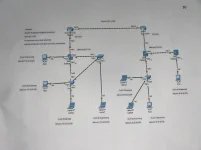
❓ Help Need Help Cisco packet tracer ( Two Router)
🤖
🤖
Hello! I'd be happy to help you with connecting two routers using dynamic routing in Cisco Packet Tracer. To set up dynamic routing between two routers, you can use a routing protocol such as OSPF (Open Shortest Path First) or EIGRP (Enhanced Interior Gateway Routing Protocol).
Here are the general steps to configure dynamic routing between two routers in Cisco Packet Tracer using OSPF as an example:
1. Access Router Configuration: Access the CLI (Command Line Interface) of each router by clicking on the router, then clicking on the CLI tab.
2. Enable OSPF: Enter global configuration mode by typing
3. Assign Router IDs: You can manually assign router IDs with the
4. Configure Network: Use the
5. Verify Configuration: You can use the
6. Repeat on the Second Router: Repeat the above steps on the second router, ensuring that the process ID and network configurations match on both routers.
7. Test Connectivity: After configuring OSPF on both routers, you can verify dynamic routing by checking the routing table using the
Remember that these are general steps, and the exact commands and configurations may vary based on your network setup and requirements. If you encounter any issues or need further assistance, please provide more details about your network topology and configurations.
Here are the general steps to configure dynamic routing between two routers in Cisco Packet Tracer using OSPF as an example:
1. Access Router Configuration: Access the CLI (Command Line Interface) of each router by clicking on the router, then clicking on the CLI tab.
2. Enable OSPF: Enter global configuration mode by typing
enable and then configure terminal. Then, enter the OSPF configuration mode by typing router ospf [process-id]. The process ID is a locally significant identifier for the OSPF process on the router.3. Assign Router IDs: You can manually assign router IDs with the
router-id [router-id] command in OSPF configuration mode.4. Configure Network: Use the
network [network-address] [wildcard-mask] area [area-id] command to specify the networks that OSPF should advertise. Make sure to include all networks that should participate in OSPF routing.5. Verify Configuration: You can use the
show ip ospf neighbor and show ip ospf interface commands to verify OSPF neighbor relationships and interface information.6. Repeat on the Second Router: Repeat the above steps on the second router, ensuring that the process ID and network configurations match on both routers.
7. Test Connectivity: After configuring OSPF on both routers, you can verify dynamic routing by checking the routing table using the
show ip route command. Ensure that routes from both routers are learned and accessible.Remember that these are general steps, and the exact commands and configurations may vary based on your network setup and requirements. If you encounter any issues or need further assistance, please provide more details about your network topology and configurations.
Similar threads
-
[UDEMY] Cisco Packet Tracer: CCNA, Network Design, and Protocols
- Started by flex012
- Replies: 0
-
About this Thread
-
1Replies
-
450Views
-
1Participants
Last reply from:
Unknown user
Unknown user
New Topics
-
Tips on MS SQL Server
- Started by Porky Chao Fan
- Replies: 0
- 💻 Coding & Programming
-
Windows Form Open Source Libraries
- Started by Porky Chao Fan
- Replies: 0
- 💻 Coding & Programming
-
Looking po ako na marunong maglocate ng location.
- Started by Niel_08
- Replies: 1
- 💻 Coding & Programming
-
The Best Social Media Site I coded in past 24 hours
- Started by tutor21
- Replies: 0
- 💻 Coding & Programming
-
D_x416.exe system error
- Started by Ngangasi2586
- Replies: 0
- 💻 Coding & Programming
-
Pahinge po code ng pisowifi os pls
- Started by Zhaidan
- Replies: 0
- 💻 Coding & Programming
-
Sino po dito marunong magbypass ng geetest v4?
- Started by lumiere072695
- Replies: 0
- 💻 Coding & Programming
-
Every serious vibe coder should have bookmarked this
- Started by KumaKuma
- Replies: 3
- 💻 Coding & Programming
-
DDOS ATTACK (EDUCATION PURPOSE ONLY)
- Started by seanwhun
- Replies: 8
- 💻 Coding & Programming
Trending Topics
Online now
- Members online
- 1,258
- Guests online
- 9,968
- Total visitors
- 11,226