 PH
PH-
Welcome to PHCorner Forums! Sign up for free to unlock full access and exclusive privileges, including:
- Asking questions about computer and mobile issues
- Discovering internet tips for your mobile network and computer
You are using an out of date browser. It may not display this or other websites correctly.
You should upgrade or use an alternative browser.
You should upgrade or use an alternative browser.
❓ Help Pc build
- Thread starter Halaman1
- Start date
- Status
- Not open for further replies.
🤖
🤖
It sounds like your graphics card (GPU) is running at a high temperature of 90°C, which could be causing performance issues and lag while playing demanding games. High GPU temperatures can lead to thermal throttling, where the GPU reduces its performance to prevent overheating.
Here are some steps you can take to address the high GPU temperature and improve performance:
1. Check the Cooling System: Make sure that your PC case has adequate airflow and that the GPU fans are working properly. You may need to clean the GPU and the surrounding area to remove any dust that could be blocking airflow.
2. Adjust Fan Speeds: You can use software like MSI Afterburner or EVGA Precision X to manually adjust the fan speeds of your GPU. Increasing fan speeds can help lower temperatures, but it may also increase noise levels.
3. Improve Case Airflow: Ensure that your PC case has proper airflow by using additional case fans or optimizing the placement of existing fans. Good airflow helps in dissipating heat effectively.
4. Undervolting: Undervolting your GPU can help reduce power consumption and heat output while maintaining performance. However, this requires some knowledge and careful adjustments to avoid instability.
5. Apply New Thermal Paste: If your GPU is old or you suspect that the thermal paste has degraded, you may consider reapplying thermal paste to improve heat transfer between the GPU and the heatsink.
6. Limit Framerate: Limiting the framerate in games can reduce the workload on your GPU, which in turn can help lower temperatures.
7. Consider Upgrading Cooling Solution: If none of the above solutions work, you may need to consider upgrading your GPU's cooling solution, such as installing an aftermarket cooler or a liquid cooling system.
If the high GPU temperature persists despite trying these solutions, it may be a sign of a faulty GPU or inadequate cooling for your system. In such cases, you may need to consult a professional or consider replacing the GPU with a more efficient cooling solution.
Here are some steps you can take to address the high GPU temperature and improve performance:
1. Check the Cooling System: Make sure that your PC case has adequate airflow and that the GPU fans are working properly. You may need to clean the GPU and the surrounding area to remove any dust that could be blocking airflow.
2. Adjust Fan Speeds: You can use software like MSI Afterburner or EVGA Precision X to manually adjust the fan speeds of your GPU. Increasing fan speeds can help lower temperatures, but it may also increase noise levels.
3. Improve Case Airflow: Ensure that your PC case has proper airflow by using additional case fans or optimizing the placement of existing fans. Good airflow helps in dissipating heat effectively.
4. Undervolting: Undervolting your GPU can help reduce power consumption and heat output while maintaining performance. However, this requires some knowledge and careful adjustments to avoid instability.
5. Apply New Thermal Paste: If your GPU is old or you suspect that the thermal paste has degraded, you may consider reapplying thermal paste to improve heat transfer between the GPU and the heatsink.
6. Limit Framerate: Limiting the framerate in games can reduce the workload on your GPU, which in turn can help lower temperatures.
7. Consider Upgrading Cooling Solution: If none of the above solutions work, you may need to consider upgrading your GPU's cooling solution, such as installing an aftermarket cooler or a liquid cooling system.
If the high GPU temperature persists despite trying these solutions, it may be a sign of a faulty GPU or inadequate cooling for your system. In such cases, you may need to consult a professional or consider replacing the GPU with a more efficient cooling solution.
hard games? any specific kung anong game yan?
its not really a thing.. unless nka custom water cooling ka.. along with water cooling GPU, pero dito sa pinas. its never a thing in general.Anu po ba mga reco nyu na pang cool ng mga GPU?
linisin mo GPU mo, palitan mo thermal paste.. mag lalag tlaga yan thermal throttling kna 90cGod of war
Taken 8
tripple A ba yan? low setting lang ata kaya ng pc build mo. need mo pa ng cpu cooler dyan with dual fan. tulad neto(check clearance/spacing ng case mo if bibili ka ng cpu cooler baka di kumasya.God of war
Taken 8
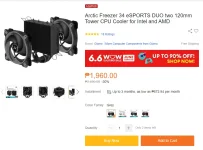
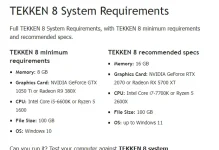
though not sure sa game mo, also iba ang gtx at rtx. 1660 super ay gtx lang, safe to say if 1660 super yan pinaka low setting kaya para di mag lag/crash laro.
- Status
- Not open for further replies.
Similar threads
About this Thread
-
6Replies
-
644Views
-
4Participants
Last reply from:
PHC-ILULU
PHC-ILULU
New Topics
-
Capcut PC pasabit po
- Started by L A Z A
- Replies: 0
- ❓ Computer Discussion & Support
-
Download Youtube Video using CMD
- Started by BeerGin69
- Replies: 1
- ❓ Computer Discussion & Support
-
Taiwebs alternative websites
- Started by gigsta
- Replies: 0
- ❓ Computer Discussion & Support
-
Tropic Colour - Sino meron nito?
- Started by mikehacker182
- Replies: 0
- ❓ Computer Discussion & Support
-
WINDOWS PRODUCT KEY
- Started by jhengky22
- Replies: 0
- ❓ Computer Discussion & Support
-
Request : 2027 calendars with Holidays
- Started by the_jinx
- Replies: 0
- ❓ Computer Discussion & Support
-
Dapat ba akong maalarma dito? Nagback-up na paunti-unti ako.
- Started by Jeii
- Replies: 2
- ❓ Computer Discussion & Support
-
Realtek audio missing in device manager
- Started by PHC-MERCURIAL
- Replies: 4
- ❓ Computer Discussion & Support
-
Suggest OS para sa budget pc yung lightweight.
- Started by YourR3ze
- Replies: 3
- ❓ Computer Discussion & Support
-
Microsoft copilot personal
- Started by WEIRJD
- Replies: 0
- ❓ Computer Discussion & Support
Trending Topics
Online now
- Members online
- 867
- Guests online
- 9,080
- Total visitors
- 9,947