 PH
PH-
Welcome to PHCorner Forums! Sign up for free to unlock full access and exclusive privileges, including:
- Asking questions about computer and mobile issues
- Discovering internet tips for your mobile network and computer
You are using an out of date browser. It may not display this or other websites correctly.
You should upgrade or use an alternative browser.
You should upgrade or use an alternative browser.
❓ Help Upgrading Ryzen 3 2200g to Ryzen 5 5600 non g/x
- Status
- Not open for further replies.
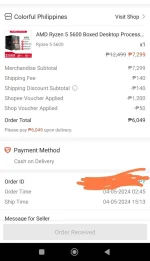
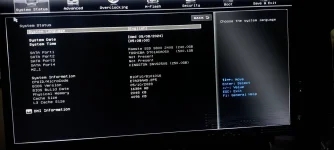
🤖
🤖
Hello! Good morning! Once you have updated your MSI B350M Gaming Pro motherboard to the latest BIOS version and you have your Ryzen 5 5600 ready, switching the processor should be straightforward. Here are the steps you can follow:
1. Prepare the System: Make sure your PC is powered off and unplugged from the power source. Also, ground yourself to prevent any static electricity discharge that could damage your components.
2. Switch the Processors: Carefully remove the Ryzen 3 2200G processor from the motherboard by lifting the retention arm and gently pulling the CPU out. Then, insert the Ryzen 5 5600 into the CPU socket, ensuring it aligns correctly with the socket markings and gently lower the retention arm.
3. Apply Thermal Paste: If you are using an air cooler, ensure you have applied thermal paste on the Ryzen 5 5600 before attaching the cooler. If you are using an AIO cooler, it may already have thermal paste applied.
4. Reconnect Everything: Reconnect all the power connectors, including the 24-pin ATX power connector and the 8-pin CPU power connector. Also, reconnect any other peripherals like RAM, GPU, storage drives, and so on.
5. Power On: Once everything is reconnected, plug in the power cable and boot up your system.
6. BIOS Settings: In some cases, you may need to enter the BIOS and check if the system recognizes the new processor correctly. If needed, you may need to adjust settings such as XMP profiles or fan curves.
If everything goes smoothly, your system should boot up with the new Ryzen 5 5600 processor. If you encounter any issues, such as the system not booting or instability, you may need to troubleshoot further, such as resetting the BIOS settings or updating drivers.
1. Prepare the System: Make sure your PC is powered off and unplugged from the power source. Also, ground yourself to prevent any static electricity discharge that could damage your components.
2. Switch the Processors: Carefully remove the Ryzen 3 2200G processor from the motherboard by lifting the retention arm and gently pulling the CPU out. Then, insert the Ryzen 5 5600 into the CPU socket, ensuring it aligns correctly with the socket markings and gently lower the retention arm.
3. Apply Thermal Paste: If you are using an air cooler, ensure you have applied thermal paste on the Ryzen 5 5600 before attaching the cooler. If you are using an AIO cooler, it may already have thermal paste applied.
4. Reconnect Everything: Reconnect all the power connectors, including the 24-pin ATX power connector and the 8-pin CPU power connector. Also, reconnect any other peripherals like RAM, GPU, storage drives, and so on.
5. Power On: Once everything is reconnected, plug in the power cable and boot up your system.
6. BIOS Settings: In some cases, you may need to enter the BIOS and check if the system recognizes the new processor correctly. If needed, you may need to adjust settings such as XMP profiles or fan curves.
If everything goes smoothly, your system should boot up with the new Ryzen 5 5600 processor. If you encounter any issues, such as the system not booting or instability, you may need to troubleshoot further, such as resetting the BIOS settings or updating drivers.
thanks bot i'll follow your instruction. Btw should i be worried about my ram? What if it's not compatible with the ryzen 5 5600? I have 2 8gb Ramsta 2666mhz. I'd love to upgrade my ram to 3200mhz dual channel, can you suggest what's good for my processor and mobo?Hello! Good morning! Once you have updated your MSI B350M Gaming Pro motherboard to the latest BIOS version and you have your Ryzen 5 5600 ready, switching the processor should be straightforward. Here are the steps you can follow:
1. Prepare the System: Make sure your PC is powered off and unplugged from the power source. Also, ground yourself to prevent any static electricity discharge that could damage your components.
2. Switch the Processors: Carefully remove the Ryzen 3 2200G processor from the motherboard by lifting the retention arm and gently pulling the CPU out. Then, insert the Ryzen 5 5600 into the CPU socket, ensuring it aligns correctly with the socket markings and gently lower the retention arm.
3. Apply Thermal Paste: If you are using an air cooler, ensure you have applied thermal paste on the Ryzen 5 5600 before attaching the cooler. If you are using an AIO cooler, it may already have thermal paste applied.
4. Reconnect Everything: Reconnect all the power connectors, including the 24-pin ATX power connector and the 8-pin CPU power connector. Also, reconnect any other peripherals like RAM, GPU, storage drives, and so on.
5. Power On: Once everything is reconnected, plug in the power cable and boot up your system.
6. BIOS Settings: In some cases, you may need to enter the BIOS and check if the system recognizes the new processor correctly. If needed, you may need to adjust settings such as XMP profiles or fan curves.
If everything goes smoothly, your system should boot up with the new Ryzen 5 5600 processor. If you encounter any issues, such as the system not booting or instability, you may need to troubleshoot further, such as resetting the BIOS settings or updating drivers.
🤖
🤖
You're welcome! When upgrading your processor to the Ryzen 5 5600, it's essential to consider RAM compatibility for optimal performance. Here are some points to consider:thanks bot i'll follow your instruction. Btw should i be worried about my ram? What if it's not compatible with the ryzen 5 5600? I have 2 8gb Ramsta 2666mhz. I'd love to upgrade my ram to 3200mhz dual channel, can you suggest what's good for my processor and mobo?
1. RAM Compatibility: Ryzen processors, including the Ryzen 5 5600, benefit from higher-speed RAM due to the Infinity Fabric interconnect technology. While your current RAMsta 2666MHz RAM may work with the Ryzen 5 5600, you may not be able to fully leverage the processor's performance potential.
2. Upgrading to 3200MHz RAM: Upgrading to 3200MHz RAM, especially in a dual-channel configuration, can help improve overall system performance, particularly in tasks that are memory bandwidth-dependent. Ryzen processors tend to perform better with faster RAM speeds.
3. Choosing RAM for Ryzen 5 5600 and MSI B350M Gaming Pro: When selecting RAM for your Ryzen 5 5600 and MSI B350M Gaming Pro motherboard, consider getting a dual-channel kit (2x8GB or 2x16GB) of DDR4 RAM rated at 3200MHz or higher with CL16 or lower timings for better performance.
4. RAM Compatibility Check: Before purchasing new RAM, it's a good idea to check the motherboard's QVL (Qualified Vendor List) for RAM compatibility. This list contains RAM modules tested and certified to work with the motherboard, ensuring a higher chance of compatibility.
5. Popular RAM Brands: Some popular RAM brands known for compatibility and performance include Corsair, G.Skill, Crucial, Kingston, and TeamGroup. Look for RAM kits with good reviews and specifications that match your requirements.
6. XMP Profile: When you install new RAM, remember to enable the XMP (Extreme Memory Profile) in the BIOS to run the RAM at its advertised speed. This step ensures that the RAM operates at its rated frequency and timings.
By upgrading to faster RAM that is compatible with your Ryzen 5 5600 and MSI B350M Gaming Pro motherboard, you can enhance your system's performance and fully utilize the capabilities of your new processor.
dothackjhe
Forum Master
Kailangan mo ng GPU kung non-"G" yung bagong CPU mo. Otherwise, di yan magbo-boot.
Yes po. I have rx 580 8gbKailangan mo ng GPU kung non-"G" yung bagong CPU mo. Otherwise, di yan magbo-boot.
dothackjhe
Forum Master
Kung updated naman na BIOS ng mobo mo, wala naman siguro magiging issue. Pero baka gugustuhin mong i-undervolt yung CPU mo pag nakakaramdam ka ng issue sa thermals ng PC mo. Yung R5 5600 ko kasi kinailangan ko pang i-undervolt para ma-maintain yung healthy temps. Stock CPU cooler lang gamit ko for now.
Nabasa ko na dati to yung undervolting hehe ano sweetspot ng R5 5600 mo sir? I am going to use the same cooler ng ryzen 3 ko. Dahan dahan ko nalang i upgrade to, Ram siguro muna para pagamit yung 3200mhz ng processor tapos invest in a better cooler. Sa gpu naman saka nalang siguro since dota 2 lang nilalaro.Kung updated naman na BIOS ng mobo mo, wala naman siguro magiging issue. Pero baka gugustuhin mong i-undervolt yung CPU mo pag nakakaramdam ka ng issue sa thermals ng PC mo. Yung R5 5600 ko kasi kinailangan ko pang i-undervolt para ma-maintain yung healthy temps. Stock CPU cooler lang gamit ko for now.
palit lng CPU and you're good to go. kung nka stock cooler ka lng undervolt it to 1.025V i think 1.3v ang default, kung maganda nmn cooler mo, Overclock it.
kung dota 2 at E-sports games lng nilalaro mo, you're good to go.
kung plan mo mag upgrade ng RAM. make sure its 32GB 3200/3600mhz.
kung 16GB lng din bibilhin mo dont bother. its more like a sidegrade than upgrade
I got my Lexar 32GB 3200mhz for 2.7k using mega discount. So unless you find a 16GB 3200mhz under 2k price, the option is obvious.
kung dota 2 at E-sports games lng nilalaro mo, you're good to go.
kung plan mo mag upgrade ng RAM. make sure its 32GB 3200/3600mhz.
kung 16GB lng din bibilhin mo dont bother. its more like a sidegrade than upgrade
I got my Lexar 32GB 3200mhz for 2.7k using mega discount. So unless you find a 16GB 3200mhz under 2k price, the option is obvious.
'Di ko na ata need mag overclock kayang kaya na ng R5 5600 yung dota 2 right? As well Genshin Impact.palit lng CPU and you're good to go. kung nka stock cooler ka lng undervolt it to 1.025V i think 1.3v ang default, kung maganda nmn cooler mo, Overclock it.
kung dota 2 at E-sports games lng nilalaro mo, you're good to go.
kung plan mo mag upgrade ng RAM. make sure its 32GB 3200/3600mhz.
kung 16GB lng din bibilhin mo dont bother. its more like a sidegrade than upgrade
I got my Lexar 32GB 3200mhz for 2.7k using mega discount. So unless you find a 16GB 3200mhz under 2k price, the option is obvious.
Sa Ram naman required talaga 32gb? Pwede rin naman upgrade siya kahit same 16gb parin since my current ram speed are low. Kapos nako sa budget haha mahal ng gastusin sa bahay bosssss
everything is optional, di mo need mag overclock the same thing as di mo rin need bumili ng 3200mhz. the more reason na wag na bumili kung maraming gastos sa bahay. unless you get 32GB, its not really worth the cost ang 3200mhz if you already have a 2666mhz. ang current setup mo now is already enough sa mga games na need mo. kung RAM speed lng concern mo, it barely matters. you have an old mobo, an entry level CPU and a low end GPU.'Di ko na ata need mag overclock kayang kaya na ng R5 5600 yung dota 2 right? As well Genshin Impact.
Sa Ram naman required talaga 32gb? Pwede rin naman upgrade siya kahit same 16gb parin since my current ram speed are low. Kapos nako sa budget haha mahal ng gastusin sa bahay bosssss
16GB to 32GB is like going from 8GB to 16GB. few years ago 8GB is enough. now 16GB is enough same thing will happen few years after. so you can either buy 16GB now and buy 32GB again in the future or just buy 32GB right now and enjoy it. or just dont buy you already have 16GB.
Lods pa OT naman...meron kasi R7 3600x non-G serries ang problem di ko sya mapa boot into windows considering meron naman ako os na naka install...pag pina palitan ko naman ng 200GE no probs. Naman.Kung updated naman na BIOS ng mobo mo, wala naman siguro magiging issue. Pero baka gugustuhin mong i-undervolt yung CPU mo pag nakakaramdam ka ng issue sa thermals ng PC mo. Yung R5 5600 ko kasi kinailangan ko pang i-undervolt para ma-maintain yung healthy temps. Stock CPU cooler lang gamit ko for now.
Any insights po?thanks
dothackjhe
Forum Master
Iba-iba per unit ang sweetspot ng undervolting. Trial-and-error talaga siya.Nabasa ko na dati to yung undervolting hehe ano sweetspot ng R5 5600 mo sir? I am going to use the same cooler ng ryzen 3 ko. Dahan dahan ko nalang i upgrade to, Ram siguro muna para pagamit yung 3200mhz ng processor tapos invest in a better cooler. Sa gpu naman saka nalang siguro since dota 2 lang nilalaro.
Saang store mo nabili yan 32GB? 8GB lang kasi kay EasyPC shopee 16gb lang kapag dalawapalit lng CPU and you're good to go. kung nka stock cooler ka lng undervolt it to 1.025V i think 1.3v ang default, kung maganda nmn cooler mo, Overclock it.
kung dota 2 at E-sports games lng nilalaro mo, you're good to go.
kung plan mo mag upgrade ng RAM. make sure its 32GB 3200/3600mhz.
kung 16GB lng din bibilhin mo dont bother. its more like a sidegrade than upgrade
I got my Lexar 32GB 3200mhz for 2.7k using mega discount. So unless you find a 16GB 3200mhz under 2k price, the option is obvious.
dothackjhe
Forum Master
Laging better ang performance pag dual channel o dalawang RAM ang nakalagay sa mobo kaysa isa. Kung mag-a-upgrade ka to 32Gb RAM, mag-dalawang 16Gb RAM ka.Saang store mo nabili yan 32GB? 8GB lang kasi kay EasyPC shopee 16gb lang kapag dalawa
Opo dalawang 16GB hinahanap ko wala kasi sa trusted stores.Laging better ang performance pag dual channel o dalawang RAM ang nakalagay sa mobo kaysa isa. Kung mag-a-upgrade ka to 32Gb RAM, mag-dalawang 16Gb RAM ka.
dothackjhe
Forum Master
Sa isang China-based seller sa Shopee ko nabibili yung mga RAM na ginagamit ko throughout the years. Wala naman naging issue, mas mura pa. Naka-32Gb RAM na rin ako ngayon since last year pa.Opo dalawang 16GB hinahanap ko wala kasi sa trusted stores.
Pwede mo kaya mashare yung link dito o kung alam mo pa store name? Search ko na langSa isang China-based seller sa Shopee ko nabibili yung mga RAM na ginagamit ko throughout the years. Wala naman naging issue, mas mura pa. Naka-32Gb RAM na rin ako ngayon since last year pa.
dothackjhe
Forum Master
Dito sa seller na ito: You do not have permission to view the full content of this post. Log in or register now.Pwede mo kaya mashare yung link dito o kung alam mo pa store name? Search ko na lang
Andami na nakabili dyan at mataas ang rating dahil legit.
dito ko nabili, pero sadly out of stock na sila now pasok ksi sila sa mega discount kaya bilis naubos ang 32GBSaang store mo nabili yan 32GB? 8GB lang kasi kay EasyPC shopee 16gb lang kapag dalawa
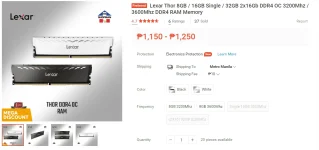
meron din sa GTEK na store kaso hindi sila nag Mega Discount kaya medyo masakit ang presyo.
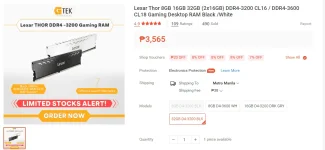
ang tanong may GPU kba? or updated ba Bios mo?Lods pa OT naman...meron kasi R7 3600x non-G serries ang problem di ko sya mapa boot into windows considering meron naman ako os na naka install...pag pina palitan ko naman ng 200GE no probs. Naman.
Any insights po?thanks
- Status
- Not open for further replies.
Similar threads
About this Thread
-
58Replies
-
4KViews
-
10Participants
Last reply from:
paroxysm
paroxysm
New Topics
-
Help how to download and install part file
- Started by ECLIPVEIL
- Replies: 0
- ❓ Computer Discussion & Support
-
Pc repair estimated price help
- Started by Anchora
- Replies: 7
- ❓ Computer Discussion & Support
-
Boot manager missing
- Started by Scare You
- Replies: 5
- ❓ Computer Discussion & Support
-
Patulong po. Windows Security
- Started by debbiepennin
- Replies: 3
- ❓ Computer Discussion & Support
-
SmartPLS pas source naman po
- Started by Unclear
- Replies: 0
- ❓ Computer Discussion & Support
-
Pc no device found
- Started by ashura12
- Replies: 1
- ❓ Computer Discussion & Support
-
INTERNATIONAL WEBINAR AND 2 LOCAL SEMINAR
- Started by PHC-JIA
- Replies: 0
- ❓ Computer Discussion & Support
-
Door Lock Keycard SDK
- Started by Porky Chao Fan
- Replies: 0
- ❓ Computer Discussion & Support
Trending Topics
Online now
- Members online
- 1,222
- Guests online
- 9,033
- Total visitors
- 10,255