 PH
PHdafuq12344
Enthusiast
Please press love to view <3 thank you!!
Uncensoring study.com lessons is actually pretty simple- it only requires delving into the developer-tools in Google Chrome
NOTE: This trick only unblocks the lesson transcripts.
Here are the steps:
1. Go to a lesson of choice on study.com and open the developer-tools in Chrome (example URL:
You do not have permission to view the full content of this post. Log in or register now.)
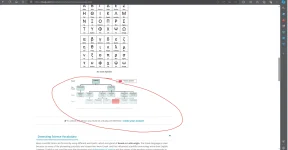
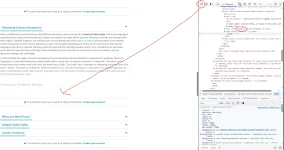
2. Use the page inspector tool and select the "Lesson Transcript" text. Confirm that in the Elements tab of the dev tools,
the line "<span>Lesson Transcript</span>" is highlighted (should be under a div that has the id "transcriptHeader")
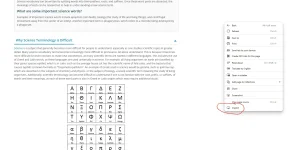
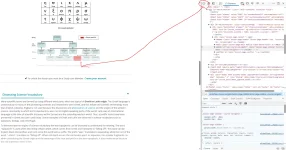 3. Hit the dropdown triangles of "<div class="transcriptContainer articleContent" data-cname="main_content>" and
<div id="mainArticle" class="transcript" data-cname="lesson_transcript"> (the latter should appear after the contents of
the first div appear)
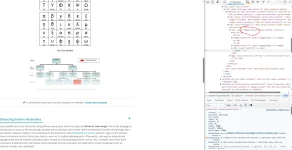
4. You should now see a div that has the id "articleMain". This is where all the text for the transcript is held, so
dropdown its contents. Next, remove the "faded-content" class from the "articleMain" div by doubleclicking on the
"faded-content" text and just removing everything in the little text-editor/box that appears. Then, remove
the "hidden" class for each div that is found inside the "articleMain" div using the same technique.
 5. Result
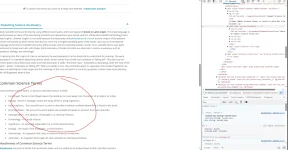
Not alot is actually 'unlocked' by doing this, but at least its something and its something free.
You do not have permission to view the full content of this post. Log in or register now.
You do not have permission to view the full content of this post. Log in or register now.
Sorry 1st thread ko po to kaya medyo magulo hehehehe
Uncensoring study.com lessons is actually pretty simple- it only requires delving into the developer-tools in Google Chrome
NOTE: This trick only unblocks the lesson transcripts.
Here are the steps:
1. Go to a lesson of choice on study.com and open the developer-tools in Chrome (example URL:
You do not have permission to view the full content of this post. Log in or register now.)
2. Use the page inspector tool and select the "Lesson Transcript" text. Confirm that in the Elements tab of the dev tools,
the line "<span>Lesson Transcript</span>" is highlighted (should be under a div that has the id "transcriptHeader")
3. Hit the dropdown triangles of "<div class="transcriptContainer articleContent" data-cname="main_content>" and<div id="mainArticle" class="transcript" data-cname="lesson_transcript"> (the latter should appear after the contents of
the first div appear)
4. You should now see a div that has the id "articleMain". This is where all the text for the transcript is held, so
dropdown its contents. Next, remove the "faded-content" class from the "articleMain" div by doubleclicking on the
"faded-content" text and just removing everything in the little text-editor/box that appears. Then, remove
the "hidden" class for each div that is found inside the "articleMain" div using the same technique.
5. ResultNot alot is actually 'unlocked' by doing this, but at least its something and its something free.
You do not have permission to view the full content of this post. Log in or register now.
You do not have permission to view the full content of this post. Log in or register now.
Sorry 1st thread ko po to kaya medyo magulo hehehehe
