PH
PHWhat is Public IP Address?
An IP address is like a digital address uniquely identifying each device connected to the internet. It's a series of numbers separated by periods or colons, depending on the version (IPv4 or IPv6) used. Like how your home address helps mail reach you, an IP address allows data to be sent and received across the internet. IP addresses are crucial for devices to communicate with each other online. They're used to route data packets, ensuring that information reaches its intended destination, whether it's establishing internet connections, accessing websites, sending emails, or streaming media. Essentially, IP addresses play a vital role in how the internet works, allowing devices to identify and talk to each other in a vast global network of interconnected devices.
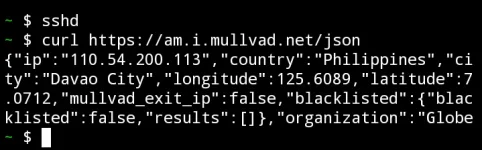
Find Your Public IP Address Using Termux
★★Using the "curl" on ifconfig.me:★★
-This is just a simple curl command, since curl comes preinstalled in termux, you don't have to do anything, just type the below command and it will give you your public IP.
The command will fetch the public IP address from the ifconfig.me service and display it in the Termux.
★★Using the "wget" command :★★
-In this method, we will use the wget (which is a preinstalled package in termux) to fetch our IP address from the ifconfig.io website.
The command will fetch the public IP address from the ifconfig.io service and display it in the terminal window.
★★Using the "curl" command public IP address lookup :★★
-I think this is one of the simplest commands out there to find your public IP address in termux. by just simply using the curl package in termux we can ping ident.me to find the public Ip of your phone.
★★Using the "wget" command with ipecho :★★
- This one uses
The command will fetch your public IP address from the ipecho.net service and display it in the terminal window
Find your local IP Address using Termux:
- If you are looking for a way to only print your Local IP address in your termux then you can use the below command. this command will apply grep on ifconfig command and grab your local IP only.
if you want to know more about your network, you can type

An IP address is like a digital address uniquely identifying each device connected to the internet. It's a series of numbers separated by periods or colons, depending on the version (IPv4 or IPv6) used. Like how your home address helps mail reach you, an IP address allows data to be sent and received across the internet. IP addresses are crucial for devices to communicate with each other online. They're used to route data packets, ensuring that information reaches its intended destination, whether it's establishing internet connections, accessing websites, sending emails, or streaming media. Essentially, IP addresses play a vital role in how the internet works, allowing devices to identify and talk to each other in a vast global network of interconnected devices.
Find Your Public IP Address Using Termux
★★Using the "curl" on ifconfig.me:★★
-This is just a simple curl command, since curl comes preinstalled in termux, you don't have to do anything, just type the below command and it will give you your public IP.
curl ifconfig.meThe command will fetch the public IP address from the ifconfig.me service and display it in the Termux.
★★Using the "wget" command :★★
-In this method, we will use the wget (which is a preinstalled package in termux) to fetch our IP address from the ifconfig.io website.
wget -qO- ifconfig.ioThe command will fetch the public IP address from the ifconfig.io service and display it in the terminal window.
★★Using the "curl" command public IP address lookup :★★
-I think this is one of the simplest commands out there to find your public IP address in termux. by just simply using the curl package in termux we can ping ident.me to find the public Ip of your phone.
curl ident.me★★Using the "wget" command with ipecho :★★
- This one uses
wget with ipecho.net.you can use it as an alternative in case the other commands are down for some reason. just copy paste this command and you will get your public ip.wget -qO- https://ipecho.net/plain ; echoThe command will fetch your public IP address from the ipecho.net service and display it in the terminal window
Find your local IP Address using Termux:
- If you are looking for a way to only print your Local IP address in your termux then you can use the below command. this command will apply grep on ifconfig command and grab your local IP only.
2>/dev/null ifconfig | grep inet | tail -1 | awk '{print $2}'if you want to know more about your network, you can type
ifconfig and you will get your network information.