PH
PHPHC-PauPau
█▓▒▒░░░Minatozaki Sana░░░▒▒▓█
this tutorial is for those who still dont know how to set up ur own slowdns from scratch
What you need:
1st. Make sure naka allow yung all port sa firewall settings ng vps provider mo para gumana ang slowdns at udp setup and then Set up mo muna yung cloudflare and domain nameserver mo. need mo muna verify yung domain mo bago ma point yung vps ip mo. need mo muna mag add ng new nameserver sa domain panel mo.
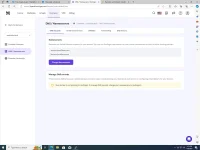
Change mo yung default nameserver into Cloudflare nameserver, (You can see in the 2nd photo) as you can see.napalitan ko na sa yung default nameserver into Cloudflare Nameserver. then wait mo lang till maverified yung Cloudflare at Ma activate yung Domain mo sa cloudflare (It may Take upto a few mins).
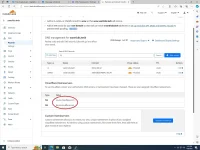
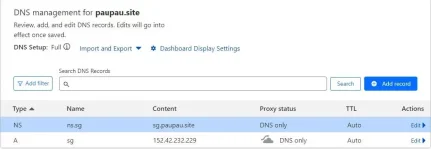
2.After mo ma setup yung Domain and Cloudflare mo , pwede ka na mag start ng pag Add ng DNS Records, By Adding "A" Record. Name =(kahit anong gusto mo) pero i will use "sg" and then i add mo na yung VPS Droplets ip mo at make sure na i turn off yung "Proxied", dapat "DNS only" lang sya
3.and now pwede ka na mag add ng "NS Records". dagdagan mo lang yung A Record na Ginawa mo Which is yung "sg" lagyan mo lang ng kahit anong words like "NS" so magiging ns.sg sya. and then sa Nameserver nmn idagdag mo yung A record na ginawa mo sa domain mo which is "sg" so magiging "sg.vantricks.tech" sya at make sure naka "dns only" sya.ang magiging output ng nameserver mo na ilalagay mo sa vpn ay "ns.sg.vantricks.tech". and then Save mo na. at after mo maipoint yung VPS Droplet ip mo kay cloudflare. Pwede ka na mag start maglagay ng Script sa VPS mo.
4.Log in mo na yung VPS mo sa Putty or ssh juice . and then make sure na naka root access ka. kung hindi nmn type mo lang "sudo su" then ilagay mo na yung ssh plus script
Use This as reference
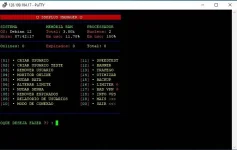
then after matapos ng script ng ssh plus, Generate ka na ng SSh account mo
5. Lagay ka naman ng Slowdns Script mo sa vps. and add mo lang yung nameserver mo and make sure na isave mo yung Pubkey kasi yan na gagamitin mo na pubkey sa lahat ng ssh na gagawin mo
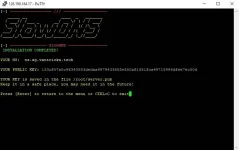
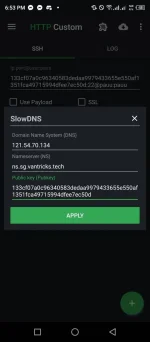
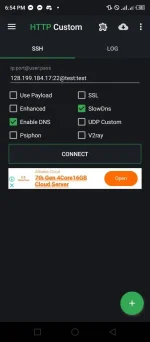
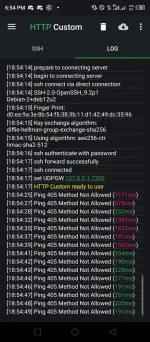
6. Input mo na ssh info, dns ip,nameserver and pubkey sa ssh custom or any injector na gamit mo and try mo na iconnect 
What you need:
- VPS Droplets
- You do not have permission to view the full content of this post. Log in or register now.
- Nameserver
- You do not have permission to view the full content of this post. Log in or register now.
- Slowdns Script
- Ssh script
- You do not have permission to view the full content of this post. Log in or register now. for pc or You do not have permission to view the full content of this post. Log in or register now. for android
- all ports firewall
1st. Make sure naka allow yung all port sa firewall settings ng vps provider mo para gumana ang slowdns at udp setup and then Set up mo muna yung cloudflare and domain nameserver mo. need mo muna verify yung domain mo bago ma point yung vps ip mo. need mo muna mag add ng new nameserver sa domain panel mo.
Change mo yung default nameserver into Cloudflare nameserver, (You can see in the 2nd photo) as you can see.napalitan ko na sa yung default nameserver into Cloudflare Nameserver. then wait mo lang till maverified yung Cloudflare at Ma activate yung Domain mo sa cloudflare (It may Take upto a few mins).
2.After mo ma setup yung Domain and Cloudflare mo , pwede ka na mag start ng pag Add ng DNS Records, By Adding "A" Record. Name =(kahit anong gusto mo) pero i will use "sg" and then i add mo na yung VPS Droplets ip mo at make sure na i turn off yung "Proxied", dapat "DNS only" lang sya
3.and now pwede ka na mag add ng "NS Records". dagdagan mo lang yung A Record na Ginawa mo Which is yung "sg" lagyan mo lang ng kahit anong words like "NS" so magiging ns.sg sya. and then sa Nameserver nmn idagdag mo yung A record na ginawa mo sa domain mo which is "sg" so magiging "sg.vantricks.tech" sya at make sure naka "dns only" sya.ang magiging output ng nameserver mo na ilalagay mo sa vpn ay "ns.sg.vantricks.tech". and then Save mo na. at after mo maipoint yung VPS Droplet ip mo kay cloudflare. Pwede ka na mag start maglagay ng Script sa VPS mo.
4.Log in mo na yung VPS mo sa Putty or ssh juice . and then make sure na naka root access ka. kung hindi nmn type mo lang "sudo su" then ilagay mo na yung ssh plus script
Use This as reference
apt-get update -y; apt-get upgrade -y; wget You do not have permission to view the full content of this post. Log in or register now. chmod 777 Plus; ./Plus
then after matapos ng script ng ssh plus, Generate ka na ng SSh account mo
5. Lagay ka naman ng Slowdns Script mo sa vps. and add mo lang yung nameserver mo and make sure na isave mo yung Pubkey kasi yan na gagamitin mo na pubkey sa lahat ng ssh na gagawin mo
rm -rf install; apt update; wget You do not have permission to view the full content of this post. Log in or register now. chmod 777 install; ./install --start
6. Input mo na ssh info, dns ip,nameserver and pubkey sa ssh custom or any injector na gamit mo
and try mo na iconnect