PH
PHWebtunnel bypass method using luckypatcher..
(ScreenShot Tutorial)
Instruction:
1.Open Lucky Patcher and find the Webtunnel.
2.Click "Open menu of patches"
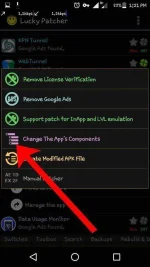
3.Click "Change the app's components"
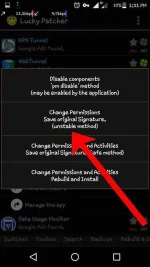
4.Click "Change permissions (Unstable method)"
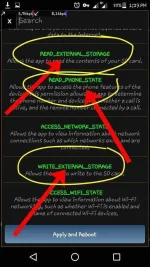
5.Click
"READ_EXTERNAL_STORAGE"
"READ_PHONE_STATE"
"WRITE_EXTERNAL_STORAGE"
6.Apply and Reboot
DONE.......
Wag mahiyang ishare!
Pero wag kalimutan ang credit at hindi ko ipagdadamot ito.. walang ibang may tutorial nito..!
©You do not have permission to view the full content of this post. Log in or register now.
(ScreenShot Tutorial)
Instruction:
1.Open Lucky Patcher and find the Webtunnel.
2.Click "Open menu of patches"
3.Click "Change the app's components"
4.Click "Change permissions (Unstable method)"
5.Click
"READ_EXTERNAL_STORAGE"
"READ_PHONE_STATE"
"WRITE_EXTERNAL_STORAGE"
6.Apply and Reboot
DONE.......
Wag mahiyang ishare!
Pero wag kalimutan ang credit at hindi ko ipagdadamot ito.. walang ibang may tutorial nito..!
©You do not have permission to view the full content of this post. Log in or register now.