PH
PHUse this for Educational Purposes!!!
Requirements:
You do not have permission to view the full content of this post. Log in or register now.
You do not have permission to view the full content of this post. Log in or register now.
(Install Nethunter Store. Open and Search Nethunter Kex and häçker's Keyboard.)
They should be look like this:

You do not have permission to view the full content of this post. Log in or register now.
You do not have permission to view the full content of this post. Log in or register now.
If you already have those requirement,let's start:
1.) Open Termux and type this command:
pkg update -y-then hit enter
2.) When prompted for an action, press
y and hit enter so you install the package maintainer's version3.) Enter the following command:
termux-setup-storage-In order to have shared storage, you need to give Termux storage access permission.This doesn't give access to external connected storage device.
4.) Then type this command:
pkg install wget-then hit enter
-When prompted: "Do you want to continue?" press
y and hit enter.5.) Then type this command:
wget -0 install-nethunter-termux https://offs.ec/2MceZWr-then hit enter
6.) Change the permissions so that you can execute the file;
chmod +x install-nethunter-termux-hit enter
7.) Then type the following command to execute the downloaded install file
./install-nethunter-termux-hit enter
9.) Now,select the image that you want to install(for my part,i choose number 1-full).Just type the corresponding number that you want and hit enter.This make take time to install(around 5 gb in my experience since i only used data).When the installation stop and ask to continue just type
y (for yes) and enter. When prompted to delete rootfs, type n and enter. Wait until it is done extracting and installing.Congrats!!!You now have installed the Kali Linux in your phone.But it is not yet the best part.Inorder to run the Kali Linux,there are few things we need to do:
10.) To start Kali Nethunter, you can use the following commands;
- To start the CLI, type;
nethunter - To setup the Nethunter Kex password, type;
nethunter kex passwd - To start Nethunter Kex(Password will be set on first startup), type;
nethunter kex - To stop Nethunter Kex GUI, type;
nethunter kex stop - To run Nethunter as root, type;
nethunter -r - You can shortened the word
nethuntercommand tonh(example:nh kex passwd,nh kex, ornh kex stop.Hope you get the point)
To do this, run or type
nh -r10.2.) Then open the file
/etc/resolv.confwith nanoNote: If nano is not installed yet,it will ask you to install it.
To install nano, type;
pkg install nano10.3.) Edit the ip address to
8.8.8.810.4.) Press
CTRL + x and enter to save the file.10.5.) Run
apt update to update the changes you make.10.6.) Run
apt install dbus-x11 -yNow,to stop killing of child process or Process 9;
10.6.1) Unlock the developer option and look for the option that says "Disable child process restrictions"
Note:Hindi po parehas yung phone natin So hanapin nyo nalang sa DevOp setting nyo.Android 13 Google Pixel po ang example na ginamit dito.
11.) Now, start
nh and nh kex.Input your password that you create in nethunter kex passwd12.) Remember the port number because you will use it when opening the Nethunter Apps
13.) Open the Nethunter Apps and input your password and the port number and click Connect.
14.) Last part.You now should have Rootles Kali Nethunter GUI on yout Android Phone
‐--------------------------------------------------------------------------
Note: Child Lock Process for any Android 12 user. Madugo po ang proseso ng pag Child Lock Process kaya hindi ko na sinali dito baka kasi magka mali² lang.Search nyo nalang sa github why nasabi kong madugo.
TIPS:
If nag out na kayo kay Termux at gusto nyo i launch ulit si Kali Nethunter,type;
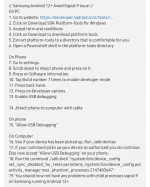
nh kex &To avoid Signal 9 issue in Samsung android 12+, follow the step below
You do not have permission to view the full content of this post. Log in or register now.