PH
PHRequirements:
 Android 14
1.) Open shizuku app and tap
2.) Turn on and open Wireless debugging by pressing on the name.(its not just a toggle)
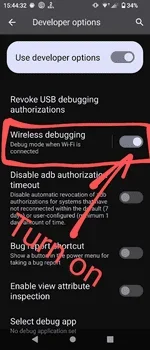
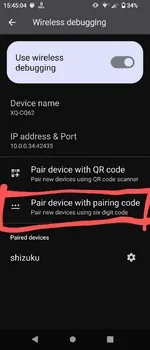
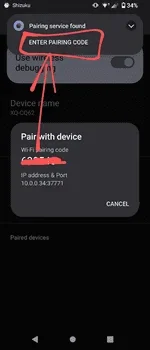
3.) After pairing,go back to Shizuku app and click
4.) Open Pixel IMS (it will ask you to grant shizuku permission )
5.) And after that press on the icon in the lower right corner (name of your carrier)
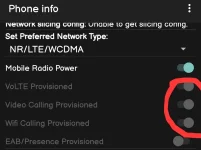
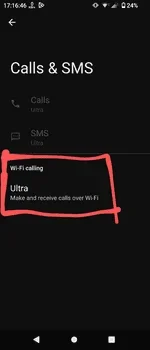
6.) After that you should be able to see this in settings.
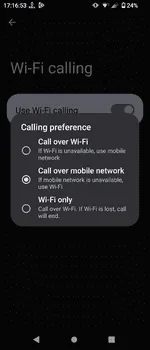
Now,you can choose your preference.
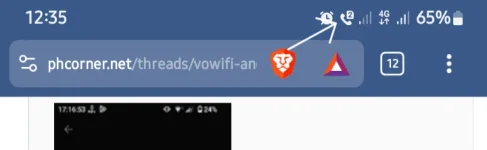
SS for example:
Pixel IMS Apk
You do not have permission to view the full content of this post. Log in or register now.
Android 14- Developer settings enabled
- Shizuku app - You do not have permission to view the full content of this post. Log in or register now.
- Pixel IMS apk
1.) Open shizuku app and tap
Pairing and click Developer Option2.) Turn on and open Wireless debugging by pressing on the name.(its not just a toggle)
3.) After pairing,go back to Shizuku app and click
Start and it will start the process.4.) Open Pixel IMS (it will ask you to grant shizuku permission )
5.) And after that press on the icon in the lower right corner (name of your carrier)
6.) After that you should be able to see this in settings.
Now,you can choose your preference.
SS for example:
Pixel IMS Apk
You do not have permission to view the full content of this post. Log in or register now.