 PH
PH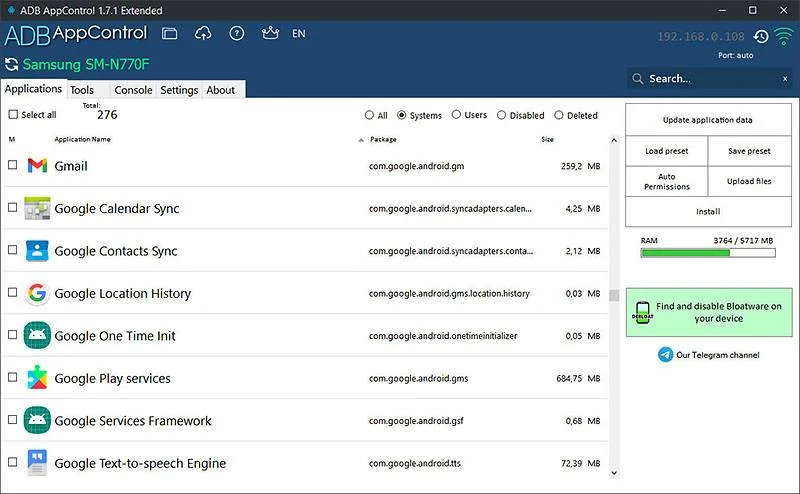
Root is not required. Works with any Android device.
Can do almost everything you dreamed about with applications.
Performance
Disabling unwanted applications will reduce the load on the CPU and free up RAM.
Battery
Some applications are poorly optimized. Uninstall them to increase your device battery lifetime!
Tweaks
Make screenshots, change the screen resolution and hide the icons in the status bar. And not only.
ADB AppControl - a new and handy desktop program, that will allow you to easily manage applications on your android device. You can disable unwanted pre-installed system apps and bloatware, or install new ones using a modern graphical interface. The program includes many useful tools and tweaks which allow you to get the better experience with your device. This is exactly the tool that you will use for many years - after trying ADB AppControl you will see that working with applications via adb has never been so easy.
System Requirements: Windows 7, 8, 8.1, 10, 11 and .NET Framework 4.6 or higher.
★ Due to Android restrictions, system applications cannot be permanently deleted and their apk files will remain on the system. There is no way to remove them without root privileges. These applications will not start and run - they are not installed for the operating system.
Features:
Advanced
- ADB Console with favorites commands
- Fastboot support
- Logcat logs
- Auto permission granting for popular apps (Tasker, Battery Stats, etc.)
- Simple file upload
- Extended Settings
- And many other features are now in the future!
App Control
- Disable and uninstall applications without root
- Multiple apps installing
- Full Split Support (APKS)
- Saving APK files of installed applications
- Permissions Manager for applications
- Saving and loading applications list-presets
- Quick search for apps on Google Play, ApkMirror, F-Droid and others
Useful tools
- Displaying device information
- Changing the screen resolution and DPI
- Hiding icons in the status bar
- Device remotely control
- Virtual volume, power, camera and navigation buttons
- Creating screenshots of the device screen
- Quick reboot in recovery and bootloader
You do not have permission to view the full content of this post. Log in or register now.