 PH
PH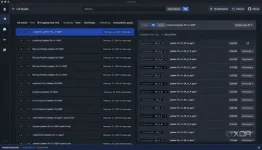
Large language models (LLM) like ᑕᕼᗩTGᑭT, Google Gemini, and Microsoft Copilot all run in the cloud, which basically means they run on somebody else's computer. Not only that, they're particularly costly to run, and that's why all of them have a ρáíd tier option that'll set you back $20 a month. However, you can run many different language models like Llama 2 locally, and with the power of LM Studio, you can run pretty much any LLM locally with ease.
Setting up LM Studio on Windows and Mac is ridiculously easy, and the process is the same for both platforms. It should also work on Linux.
LM Studio requirements
●Apple Silicon Mac (M1/M2/M3) with macOS 13.6 or newer
●Windows / Linux PC with a processor that supports AVX2 (typically newer PCs)
●16GB+ of RAM is recommended. For PCs, 6GB+ of VRAM is recommended
●NVIDIA/AMD GPUs supported
●An (optionally fast) internet connection to download models
Step 1)Download and launch LM Studio
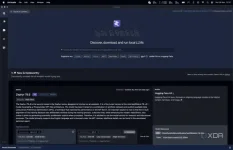
You'll first need to download LM Studio from the website for whatever platform you're on. This download may take a bit of time as it's roughly 400MB, depending on the speed of your internet connection. Once it's downloaded, launch it, and it should look like the above screenshot.
Step 2)
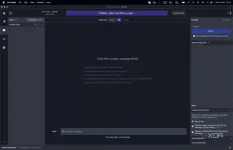
Next, choose a model to download by clicking the magnifying glass and looking through the options available. Most of these models will be several gigabytes in size and may take a while to download. Google's recently-released Gemma model is available too if you want to give it a try, and so is Mixtral 8x7B.
Have a browse around, do some research, and see if any catch your eye. Zephyr is a model trained to be an assistant, so it can be useful once set up. Once you've chosen one, do the following:
1.)Wait for it to finish downloading.
2.)Click the Speech Bubble on the left.
3.)At the top, select your model.
4.)Wait for it to load.
Step 3)
Chat!!
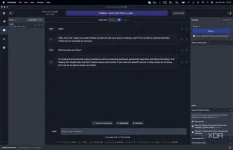
It's seriously that simple, and you've already downloaded and set up an LLM locally to speak with. At this point, you can enable GPU acceleration on the right-hand side to speed up responses if you want, though it's not necessary.
●Why use an LLM locally?
Privacy, primarily
If you're wondering why you would want to use an LLM locally, there are a few reasons. The first, and one that concerns most people, is privacy. LLMs are powerful tools that can be used for organizational and planning purposes, some of which may be sensitive. If you also want to ask an LLM about private code (for example, if you're debugging it), then you should never use a cloud-based one.
These are only scratching the surface of reasons, too. Sometimes, these LLMs are tuned toward specific use cases that Bard, ᑕᕼᗩTGᑭT, and Bing Chat can't provide. As already mentioned, Zephyr is trained as a virtual assistant, and that level of specificity isn't there in other LLMs. Definitely give LM Studio a try if you're interested in trying one out because it's never been easier to run your own LLM!