PH
PH●Microsoft Copilot
Microsoft Copilot, for most people, is the best alternative to ᑕᕼᗩTGᑭT. It uses the same GPT-4 model, can generate images for free using the same image generation model, DALL-E, and it has a great app that you can install on Android or iOS. It's also built-in to Windows computers, so you may already have it without really realizing.
If you get a Copilot Pro subscription as well, you'll be able to integrate it with a Microsoft 365 subscription, generate more images, get faster responses, and a whole lot more. If you're looking to spend money on an AI subscription then Microsoft Copilot is one of the best out there.
●Google Gemini

Google's Gemini model is one of the newer kids on the block, though only because it's a rebrand of the original Bard model that released last year. It's still using the same Gemini Pro model under the hood for free versions, though an Advanced subscription will get you Gemini Ultra, a more powerful AI model. While Google has currently disabled image generation, it's expected to come back soon, and you can do a whole host of other things with it too. Plus, a Gemini Advanced subscription gets you 1TB of Google Cloud storage among other Google One perks.
Google's Gemini is great even in its free version, though, and it might be worth trying out to see if it fits your needs. It's going to be replacing the Google Assistant on most Android phones in the future, so you'll likely be getting used to this one regardless. This one doesn't use any GPT-based language model, and instead uses Google's own Gemini model.
●Phind
Specifically for Coders
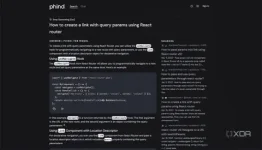
If you're a programmer and you want an LLM that works for you, give Phind a try. It's an LLM designed specifically to give fast, accurate answers to programming-related questions and can help with any language you want. It can give complex answers with sources for all of its code that it gives you, meaning you can see where the code came from, the context it was used in, and you can make sure that you aren't plagiarising anything if you do end up using some of the code, too.
Phind is a powerful tool, though a niche one that may not suit everyone. It's only for coders, so if you don't do any programming, then this isn't for you.
●LM Studio
Host your language model
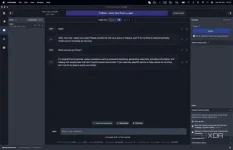
If you don't want to use any of the big services, you can run your own language model using LM Studio. LM Studio is a program that will show you language models you can download, and will then deploy them on your computer. You need a powerful graphics card with a lot of vRAM to do that, but if you have one, then you can run one with ease. Models like Llama 2, Mixtral 8x7B, and Zephyr to name a few are all capable of being run locally on your own computer.
This one takes a bit of technical know-how, but I highly recommend it even just to have a little bit of fun with language models. These run on your own computer, so you can do whatever you want with them and then shut them down when you're done.