 PH
PHIto na Guys !.
Requirements :
-Any Tunneling applications (Hotspot Shield,Psiphon,etc.)
-No Root Required
-No Need Load
------------------------------------------
How to do it :
1. Go to settings
2. Tap Mobile Networks & go to Access Point Names
3. Add a new APNs
Name : Globe Inet/Any Name that you want
APN : You do not have permission to view the full content of this post. Log in or register now.
Proxy : Not Set
Port : Not Set
Username : Not Set
Password : Not Set
Server : Not Set
MMSC : Not Set
MMS proxy : Not Set
MMS port : Not Set
MCC : 515
MNC : 02
Authentication Type : Not Set
APN Type : Not Set
APN Protocol : IPv4
Enable/Disable APN : APN enabled [check]
bearer : Unspecified
4. save the new APN the you've created
5. Enable/On your Mobile Data
6. Open Hotspot Shield/etc.
7. Server : Best Performance/United States/Philippines
Must Open your Handler Menu and After That you need to tap Save.
Then Go to More Options and you need to tap " Use The Following Settings"
and your done !. Enjoy Browsing.
Follow niyo na lang po ang mga ginawa ko sa Handler Menu at sa More Options
Scroll Down na lang po kayo
Follow the Screenshot !!!
[ Handler Menu Dapat Ganito ]
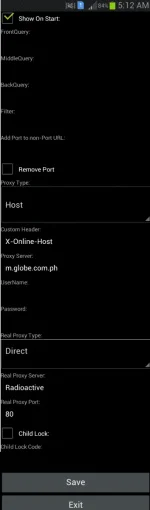
[More Options Dapat Ganito Ang Ayos]
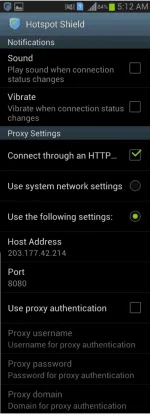
Tapos Start Tunnel ka na Wait ka lang hanggang sa maka connect sa IP and kapag naka connect na pwede na mag browse .. Share lang !! .
Sa mga hindi pa nakaka alam.
Requirements :
-Any Tunneling applications (Hotspot Shield,Psiphon,etc.)
-No Root Required
-No Need Load
------------------------------------------
How to do it :
1. Go to settings
2. Tap Mobile Networks & go to Access Point Names
3. Add a new APNs
Name : Globe Inet/Any Name that you want
APN : You do not have permission to view the full content of this post. Log in or register now.
Proxy : Not Set
Port : Not Set
Username : Not Set
Password : Not Set
Server : Not Set
MMSC : Not Set
MMS proxy : Not Set
MMS port : Not Set
MCC : 515
MNC : 02
Authentication Type : Not Set
APN Type : Not Set
APN Protocol : IPv4
Enable/Disable APN : APN enabled [check]
bearer : Unspecified
4. save the new APN the you've created
5. Enable/On your Mobile Data
6. Open Hotspot Shield/etc.
7. Server : Best Performance/United States/Philippines
Must Open your Handler Menu and After That you need to tap Save.
Then Go to More Options and you need to tap " Use The Following Settings"
and your done !. Enjoy Browsing.
Follow niyo na lang po ang mga ginawa ko sa Handler Menu at sa More Options
Scroll Down na lang po kayo
Follow the Screenshot !!!
[ Handler Menu Dapat Ganito ]
[More Options Dapat Ganito Ang Ayos]
Tapos Start Tunnel ka na Wait ka lang hanggang sa maka connect sa IP and kapag naka connect na pwede na mag browse ..
Share lang !! .Sa mga hindi pa nakaka alam.