 PH
PHUpdates 1 tap NoLoad | What's New | DKA System new Version 3.2.5 | The most accurate vpn partner | Friendly GUI | New Added Features |
Ver.3.2.7 New Update
Q1)
What's you should do to avoid encountering issues using DKA System?
A1)
You should carefully re-read all steps and feedbacks from old versions to new versions, skip only if already done reviews.
Q2)
Is it necessary to re-read thread posts?
A2)
Yes, because of realtime updates in feedback's and thread's post updates.
Q3)
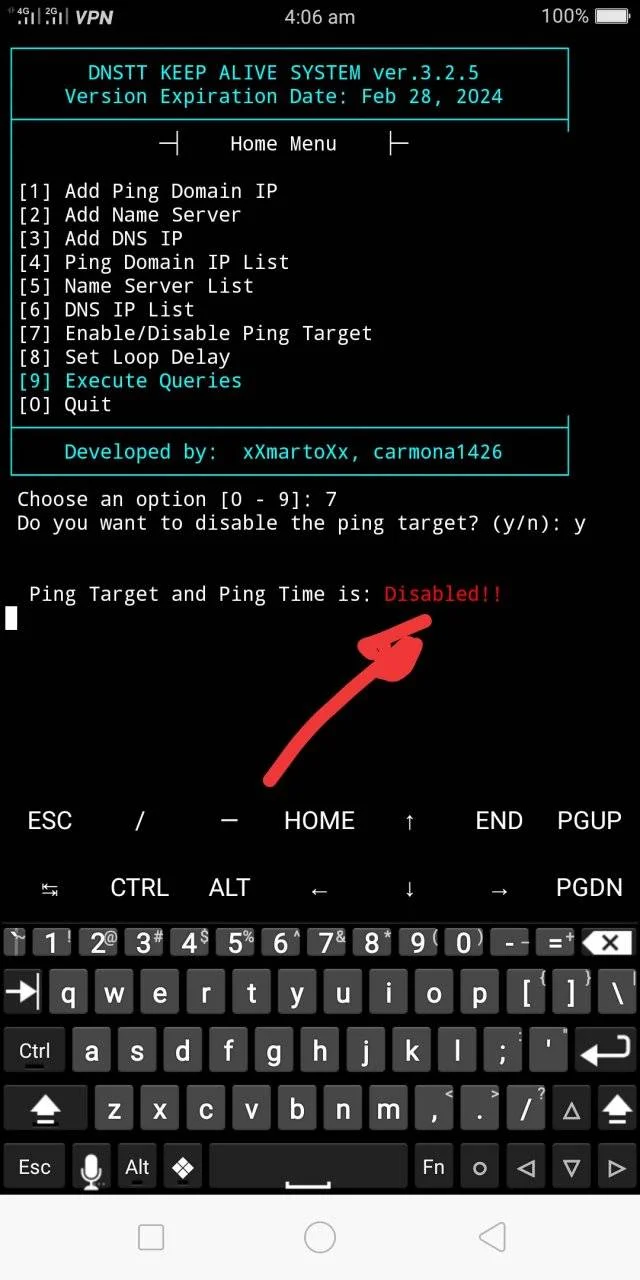
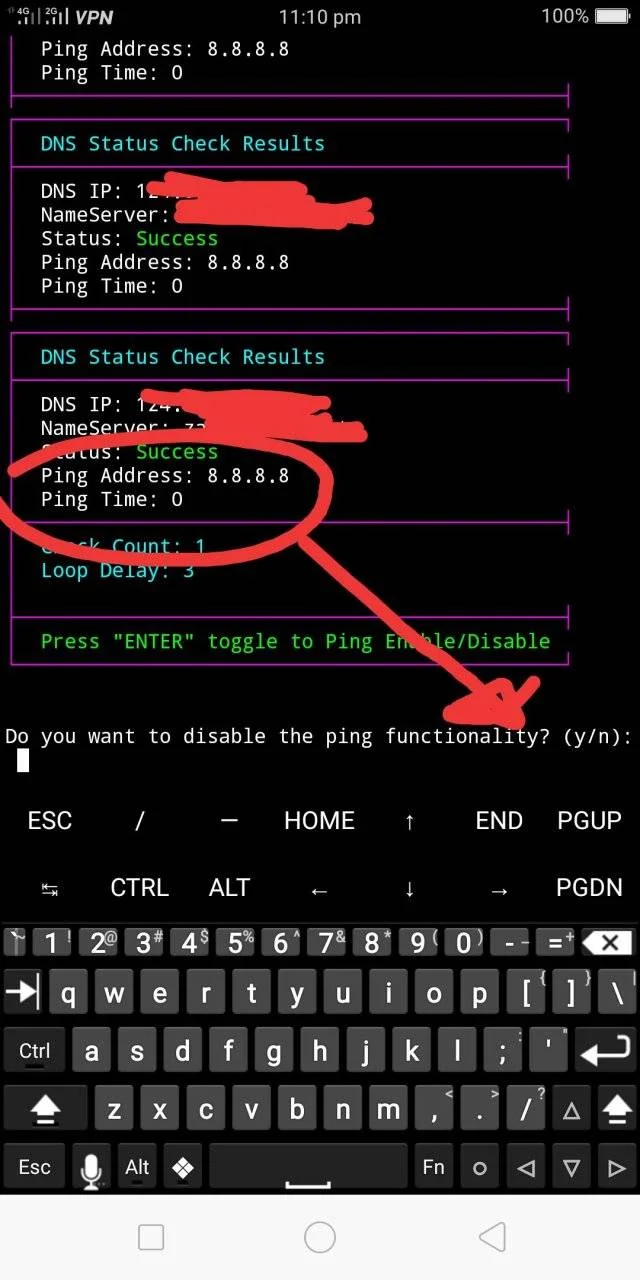
What will happen if Enabling or Disabling Ping Time?
A3)
Ping Time is for determining zero ping result for VPN config 1 tap connected feature of DKASYSTEM.
While Disabling Ping, if already in a state of success zero ping time, to accelerate loop time, for rapid checking every IPs or DNS entries in DKASYSTEM in termux.
For more ->.Details
Step1
Input mo ito sa termux app
then
hit enter
Step2
Create ka account sa mga ssh site, piliin mo yung slow dns or v2ray dns then i-copy mo yung NS ng server
If you see in the screen message type "startgtm"
then
type it and hit enter
if not
try this
termux-setup-storage
then
hit enter
(you should allow permission)
then
type startgtm
then
hit enter
then
add mo pinaka malakas, para sa ping after choosing add domains IPs. option.
then
paste mo NS ng server mo after choosing #2
ganun din paste mo dns IP ng device mo after choosing #3 (kung hindi alam ang DNS IP ng config na naka-lock, yung 124.6.181.25 DNS default ng gtm ang i-add sa DKA sa termux Or hunt ka na lang kung config owner ka)
then
choose #7 if you want to enable/disable ping time.
then
hit enter
then
#8 choose between 5-15 for loop delay
hit enter
then
#9 to execute.
then
hit enter
You should see a "begin" message.
then
if the result showing "success" and ping result is zero, you are successfully in a stab connection status (Pag nagpula sa status at ping zero huwag muna mag eruplano, hintayin yung next test, pag green status at ping zero, one tap connected yan.)


Last step
Set the vpn app with your own config then
Set vpn to bypass apps with your choice for ex. termux.
then
Connect your config in your vpn app,
Q1) Bakit kelangan i-bypass ang termux sa pinoproxy-han ng vpn?
A1) Dahil magkaka error sa DKA system sa termux, magigimg failed na lahat ang result kung gumagamit ng noload setup sa vpn app, maliban na lamang kung may load or connected sa may net na wifi.
Q2) Kailangan ba ng net para ma-update si DKA System?
A2) Yes kelangan, kung si termux ay binay-pass ni vpn, hindi makaka-download ng mga installer or updates para kay termux, maliban na kung may net/load at off muna si vpn OR off muna ang bypass mode para sa lahat ng apps including termux upang ma-proxy-han.
Q3)
A3)
google or dns IP ng malalakas na server yung mga free DNS.
Q4)
A4)
re-install mo, huwag mo skip, saka mo na lang skip kung na install na mga repo sa next reinstall ng futute new updated versions, at siguruhin mo muna yung storage permission
Q5)
A5)
future updates, pwede nang idisabled ang ping, pero sa ping nalalaman kung goods na yung device IP mo.
Q6)
Ano ang primarily na dapat gawing ping target?
A6)
default ping IPs, tulad ng 0.0.0.0, 127.0.0.1, device ip address, google dns, cloudflare dns, secondary (optional) domain IPs like You do not have permission to view the full content of this post. Log in or register now..
Q7)
Ano naman para sa nameserver?
A7)
Yung copy mo mula sa server kung saan ka gumawa ng account (vpn account).
Q8)
Ano naman para sa dns IP?
Q8)
Yung copy mo mula sa bug hunting tulad ng 124.6.181.x or 112.198.111.x etc. (It is just a sample dns IPs, hunt for your own bug dns IPs).
Q9)
What will happen if Enabling or Disabling Ping Time?
A9)
Ping Time is for determining zero ping result for VPN config 1 tap connected feature of DKASYSTEM.
While Disabling Ping, if already in a state of success zero ping time, to accelerate loop time, for rapid checking every IPs or DNS entries in DKASYSTEM in termux.
Q10)
A10)
hindi ko sinet para lumampas sa 50ms ang result kaya pag ang ping 50 pataas failed na yung ping result and back to zero na lang
DEV:
by xXmartoXx and carmona1426
Features & Bug fixes:
Old Version 2.4.5
1) User can now skip installing termux repo N or Y.
2) User can add multiple inputs one line with space or one list.
3) User can now assured only IPs or Domains will be added into system.
4) Easy to install in termux (If storage is permitted to store data - command
5) The only accurate and powerful tool for dnstt combined with pinger
6) Bug fixed in testing, Now it can show 1 by 1 testing for each inputs.
7) It gives a realtime result while turning airplane mode off/on.
8) VPN Config is now one tap connected if the result shows "green success and zero ping".
9) The all time partner for your vpn config NoLoad no Block.
10) With Options, navigate is easy.
New Version 3.2.5
1) Added new options to edit the stored data.
2) Can change the line location of entries in the stored data.
3) No difficulties in adding, changing, deleting, and merging existing entries in the data.
4) Toggle to Ping Enable/Disable while in looping time, Press "Enter" to Disable or Enable P8ng Time.
5) Added in Home menu an option to Disable/Enable Ping Time.
Future updates plan:
1) User can select option to hide the screen display results specially for DNS IPs, Nameservers amd Ping IPs
Done update.
Until next UPDATES
Keep giving a feedback to enjoy more DEV.
Special thanks din kay co-dev carmona1426
Ver.3.2.7 New Update
Q1)
What's you should do to avoid encountering issues using DKA System?
A1)
You should carefully re-read all steps and feedbacks from old versions to new versions, skip only if already done reviews.
Q2)
Is it necessary to re-read thread posts?
A2)
Yes, because of realtime updates in feedback's and thread's post updates.
Q3)
What will happen if Enabling or Disabling Ping Time?
A3)
Ping Time is for determining zero ping result for VPN config 1 tap connected feature of DKASYSTEM.
While Disabling Ping, if already in a state of success zero ping time, to accelerate loop time, for rapid checking every IPs or DNS entries in DKASYSTEM in termux.
For more ->.Details
Step1
Input mo ito sa termux app
Code:
curl -sL https://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@raw.githubusercontent.com/agent0002/dev-xxmartoxx-carmona-gtm-stab/main/gtm-mainstart.sh -o "$PREFIX/bin/gtm-mainstart" && chmod +x "$PREFIX/bin/gtm-mainstart" && gtm-mainstartthen
hit enter
Step2
Create ka account sa mga ssh site, piliin mo yung slow dns or v2ray dns then i-copy mo yung NS ng server
If you see in the screen message type "startgtm"
then
type it and hit enter
if not
try this
termux-setup-storage
then
hit enter
(you should allow permission)
then
type startgtm
then
hit enter
then
add mo pinaka malakas, para sa ping after choosing add domains IPs. option.
then
paste mo NS ng server mo after choosing #2
ganun din paste mo dns IP ng device mo after choosing #3 (kung hindi alam ang DNS IP ng config na naka-lock, yung 124.6.181.25 DNS default ng gtm ang i-add sa DKA sa termux Or hunt ka na lang kung config owner ka)
then
choose #7 if you want to enable/disable ping time.
then
hit enter
then
#8 choose between 5-15 for loop delay
hit enter
then
#9 to execute.
then
hit enter
You should see a "begin" message.
then
if the result showing "success" and ping result is zero, you are successfully in a stab connection status (Pag nagpula sa status at ping zero huwag muna mag eruplano, hintayin yung next test, pag green status at ping zero, one tap connected yan.)
Last step
Set the vpn app with your own config then
Set vpn to bypass apps with your choice for ex. termux.
then
Connect your config in your vpn app,
Q1) Bakit kelangan i-bypass ang termux sa pinoproxy-han ng vpn?
A1) Dahil magkaka error sa DKA system sa termux, magigimg failed na lahat ang result kung gumagamit ng noload setup sa vpn app, maliban na lamang kung may load or connected sa may net na wifi.
Q2) Kailangan ba ng net para ma-update si DKA System?
A2) Yes kelangan, kung si termux ay binay-pass ni vpn, hindi makaka-download ng mga installer or updates para kay termux, maliban na kung may net/load at off muna si vpn OR off muna ang bypass mode para sa lahat ng apps including termux upang ma-proxy-han.
Q3)
paano yung ping domain saan makahanap non?
A3)
google or dns IP ng malalakas na server yung mga free DNS.
Q4)
command not found nung tinype ko yung startgtm paps?
A4)
re-install mo, huwag mo skip, saka mo na lang skip kung na install na mga repo sa next reinstall ng futute new updated versions, at siguruhin mo muna yung storage permission
Code:
termux-setup-storageQ5)
Thanks Ts ask ko lang bat required mag ping Gamit Ang DKA system?
A5)
future updates, pwede nang idisabled ang ping, pero sa ping nalalaman kung goods na yung device IP mo.
Q6)
Ano ang primarily na dapat gawing ping target?
A6)
default ping IPs, tulad ng 0.0.0.0, 127.0.0.1, device ip address, google dns, cloudflare dns, secondary (optional) domain IPs like You do not have permission to view the full content of this post. Log in or register now..
Q7)
Ano naman para sa nameserver?
A7)
Yung copy mo mula sa server kung saan ka gumawa ng account (vpn account).
Q8)
Ano naman para sa dns IP?
Q8)
Yung copy mo mula sa bug hunting tulad ng 124.6.181.x or 112.198.111.x etc. (It is just a sample dns IPs, hunt for your own bug dns IPs).
Q9)
What will happen if Enabling or Disabling Ping Time?
A9)
Ping Time is for determining zero ping result for VPN config 1 tap connected feature of DKASYSTEM.
While Disabling Ping, if already in a state of success zero ping time, to accelerate loop time, for rapid checking every IPs or DNS entries in DKASYSTEM in termux.
Q10)
Pero ganyan b talaga boss? Failed status pero 0 ang ping results?
A10)
hindi ko sinet para lumampas sa 50ms ang result kaya pag ang ping 50 pataas failed na yung ping result and back to zero na lang
DEV:
by xXmartoXx and carmona1426
Features & Bug fixes:
Old Version 2.4.5
1) User can now skip installing termux repo N or Y.
2) User can add multiple inputs one line with space or one list.
3) User can now assured only IPs or Domains will be added into system.
4) Easy to install in termux (If storage is permitted to store data - command
Code:
termux-setup-storage5) The only accurate and powerful tool for dnstt combined with pinger
6) Bug fixed in testing, Now it can show 1 by 1 testing for each inputs.
7) It gives a realtime result while turning airplane mode off/on.
8) VPN Config is now one tap connected if the result shows "green success and zero ping".
9) The all time partner for your vpn config NoLoad no Block.
10) With Options, navigate is easy.
New Version 3.2.5
1) Added new options to edit the stored data.
2) Can change the line location of entries in the stored data.
3) No difficulties in adding, changing, deleting, and merging existing entries in the data.
4) Toggle to Ping Enable/Disable while in looping time, Press "Enter" to Disable or Enable P8ng Time.
5) Added in Home menu an option to Disable/Enable Ping Time.
Future updates plan:
1) User can select option to hide the screen display results specially for DNS IPs, Nameservers amd Ping IPs
Done update.
Until next UPDATES
Keep giving a feedback to enjoy more DEV.
Special thanks din kay co-dev carmona1426


