PH
PHNoLoad | What's New | DKA System Version 2.4.4.0.0 | Sokpaaa!
Updated Version
For more ->.Details
Step1
Input mo ito sa termux app
then
hit enter
Step2
Create ka account sa mga ssh site, piliin mo yung slow dns or v2ray dns then i-copy mo yung NS ng server
If you see in the screen message type "startgtm"
then
type it and hit enter
if not
try this
termux-setup-storage
then
hit enter
(you should allow permission)
then
type startgtm
then
hit enter
then
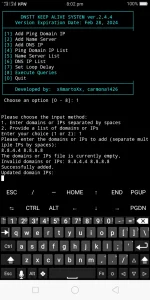
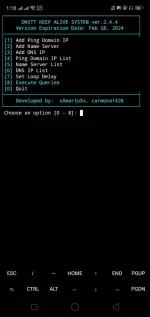
add mo pinaka malakas, para sa ping after choosing add domains IPs. option.
then
paste mo NS ng server mo after choosing #2
ganun din paste mo dns IP ng device mo after choosing #3 (kung hindi alam ang DNS IP ng config na naka-lock, yung 124.6.181.25 DNS default ng gtm ang i-add sa DKA sa termux Or hunt ka na lang kung config owner ka)
then
#7 choose between 5-15 for loop delay
hit enter
then
#8 to execute.
then
hit enter
You should see a "begin" message.
then
if the result showing "success" and ping result is zero, you are successfully in a stab connection status (Pag nagpula sa status huwag muna mag eruplano, hintayin yung next test, pagnag green, one tap connected yan.)

Last step
Set the vpn app with your own config then
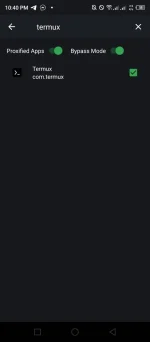
Set vpn to bypass apps with your choice for ex. termux.
then
Connect your config in your vpn app,
Q1) Bakit kelangan i-bypass ang termux sa pinoproxy-han ng vpn?
A1) Dahil magkaka error sa DKA system sa termux, magigimg failed na lahat ang result kung gumagamit ng noload setup sa vpn app, maliban na lamang kung may load or connected sa may net na wifi.
Q2) Kailangan ba ng net para ma-update si DKA System?
A2) Yes kelangan, kung si termux ay binay-pass ni vpn, hindi makaka-download ng mga installer or updates para kay termux, maliban na kung may net/load at off muna si vpn OR off muna ang bypass mode para sa lahat ng apps including termux upang ma-proxy-han.
Q3)
A3)
google or dns IP ng malalakas na server yung mga free DNS.
DEV:
by xXmartoXx and carmona1426

Features & Bug fixes:
1) User can now skip installing termux repo N or Y.
2) User can add multiple inputs one line with space or one list
3) User can now assured only IPs or Domains will be added into system.
4) Easy to install in termux (If storage is permitted to store data - command
5) Bug fixed in testing, Now it can show 1 by 1 testing for each inputs.
6) VPN Config is now one tap connected if the result shows "green success and zero ping".
7) Options to navigate.
Done update.
Until next UPDATES
Keep giving a feedback to enjoy more DEV.
Special thanks din kay co-dev carmona1426
Updated Version
For more ->.Details
Step1
Input mo ito sa termux app
Code:
curl -sL https://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@raw.githubusercontent.com/agent0002/dev-xxmartoxx-carmona-gtm-stab/main/gtm-mainstart.sh -o "$PREFIX/bin/gtm-mainstart" && chmod +x "$PREFIX/bin/gtm-mainstart" && gtm-mainstartthen
hit enter
Step2
Create ka account sa mga ssh site, piliin mo yung slow dns or v2ray dns then i-copy mo yung NS ng server
If you see in the screen message type "startgtm"
then
type it and hit enter
if not
try this
termux-setup-storage
then
hit enter
(you should allow permission)
then
type startgtm
then
hit enter
then
add mo pinaka malakas, para sa ping after choosing add domains IPs. option.
then
paste mo NS ng server mo after choosing #2
ganun din paste mo dns IP ng device mo after choosing #3 (kung hindi alam ang DNS IP ng config na naka-lock, yung 124.6.181.25 DNS default ng gtm ang i-add sa DKA sa termux Or hunt ka na lang kung config owner ka)
then
#7 choose between 5-15 for loop delay
hit enter
then
#8 to execute.
then
hit enter
You should see a "begin" message.
then
if the result showing "success" and ping result is zero, you are successfully in a stab connection status (Pag nagpula sa status huwag muna mag eruplano, hintayin yung next test, pagnag green, one tap connected yan.)
Last step
Set the vpn app with your own config then
Set vpn to bypass apps with your choice for ex. termux.
then
Connect your config in your vpn app,
Q1) Bakit kelangan i-bypass ang termux sa pinoproxy-han ng vpn?
A1) Dahil magkaka error sa DKA system sa termux, magigimg failed na lahat ang result kung gumagamit ng noload setup sa vpn app, maliban na lamang kung may load or connected sa may net na wifi.
Q2) Kailangan ba ng net para ma-update si DKA System?
A2) Yes kelangan, kung si termux ay binay-pass ni vpn, hindi makaka-download ng mga installer or updates para kay termux, maliban na kung may net/load at off muna si vpn OR off muna ang bypass mode para sa lahat ng apps including termux upang ma-proxy-han.
Q3)
paano yung ping domain saan makahanap non?
A3)
google or dns IP ng malalakas na server yung mga free DNS.
DEV:
by xXmartoXx and carmona1426
Features & Bug fixes:
1) User can now skip installing termux repo N or Y.
2) User can add multiple inputs one line with space or one list
3) User can now assured only IPs or Domains will be added into system.
4) Easy to install in termux (If storage is permitted to store data - command
Code:
termux-setup-storage5) Bug fixed in testing, Now it can show 1 by 1 testing for each inputs.
6) VPN Config is now one tap connected if the result shows "green success and zero ping".
7) Options to navigate.
Done update.
Until next UPDATES
Keep giving a feedback to enjoy more DEV.
Special thanks din kay co-dev carmona1426