 PH
PHS4BRET00TH
Leecher
Methods on how to root your Samsung Galaxy A05 ( or any A Series )
Pre-requisites
1. Samsung A-Series Smartphone
2. Laptop/Desktop
3. Internet Connection
4. Risking your Warranty ( rooting your phone is automatically void your warranty )
5. USB Cable(s) ( A to C Cable Connection )
Methods
1. Unlock your bootloader
a. Go to Settings ( about phone )
b. Tap Software Information
C. Tap build number ( until a pop message saying "developer mode already turned on"
2. Off your Smartphone, then wait for 1 minute.
a. Press volume up and down
b. plug your phone into your laptop, wait
till your Phone booted into bootloader
C. Follow the instruction on how to unlock bootloader ( pressing and holding volume up )
d. It will reboot after successfully unlocking bootloader
3. Using your Laptop, download Odin, Samsung drivers ( You do not have permission to view the full content of this post. Log in or register now. )
4. Download Samsung Firmware (
You do not have permission to view the full content of this post. Log in or register now. )
a. Choose the XTC Version
5. Download Magisk (
You do not have permission to view the full content of this post. Log in or register now. ), install it on your phone
6. Extract the downloaded firmware, then COPY THE AP FILE IN THE EXTRACTED FIRMWARE TO YOUR PHONE
7. Open Magick then ρá†ch/Install the AP File you copied
Watch this
You do not have permission to view the full content of this post. Log in or register now.
a. Copy the patched AP into your laptop
8. Install the Samsung driver and open the Odin in your laptop
- watch this
You do not have permission to view the full content of this post. Log in or register now.
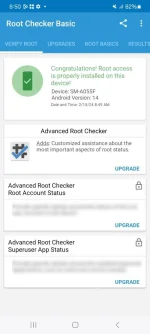
Pre-requisites
1. Samsung A-Series Smartphone
2. Laptop/Desktop
3. Internet Connection
4. Risking your Warranty ( rooting your phone is automatically void your warranty )
5. USB Cable(s) ( A to C Cable Connection )
Methods
1. Unlock your bootloader
a. Go to Settings ( about phone )
b. Tap Software Information
C. Tap build number ( until a pop message saying "developer mode already turned on"
2. Off your Smartphone, then wait for 1 minute.
a. Press volume up and down
b. plug your phone into your laptop, wait
till your Phone booted into bootloader
C. Follow the instruction on how to unlock bootloader ( pressing and holding volume up )
d. It will reboot after successfully unlocking bootloader
3. Using your Laptop, download Odin, Samsung drivers ( You do not have permission to view the full content of this post. Log in or register now. )
4. Download Samsung Firmware (
You do not have permission to view the full content of this post. Log in or register now. )
a. Choose the XTC Version
5. Download Magisk (
You do not have permission to view the full content of this post. Log in or register now. ), install it on your phone
6. Extract the downloaded firmware, then COPY THE AP FILE IN THE EXTRACTED FIRMWARE TO YOUR PHONE
7. Open Magick then ρá†ch/Install the AP File you copied
Watch this
You do not have permission to view the full content of this post. Log in or register now.
a. Copy the patched AP into your laptop
8. Install the Samsung driver and open the Odin in your laptop
- watch this
You do not have permission to view the full content of this post. Log in or register now.