 PH
PHrainych_ran
Contributor

What's this?
A simple web tool that allows you to download songs from Spotify. You can download a song either by entering a track, album, or playlist link. You can also download the entire album or playlist in ZIP format. It also adds all the metadata like cover image, artists, and release date in the downloaded songs. Show, Podcast, and Artist page links aren't supported yet.NOTE: We don't host any copyrighted material. We use 3rd parties to serve our users with the materials they desire. We aren't supposed to be held responsible for anything.
Features
- Downloads Spotify songs.
- Downloads Spotify albums.
- Downloads Spotify playlists.
- Downloads as 320kbps MP3.
- Puts all the metadata in the downloaded MP3.
- Downloads full album/playlist in ZIP.
- Fastest Spotify downloader!
- Runs in the browser, no need to install anything!
How to use?
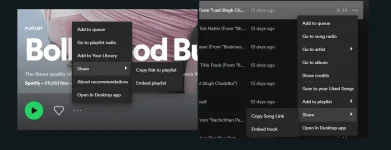
- Open your Spotify app.
- Find the track, album or playlist you would like to download.
- Click the "3 dots".
- Select "Share" and click on "Copy link".
- Paste the link above and click "Submit".
- Wait for the tool to process.
- Click the "Download" button below a track you would like to download.
Or click "Download ZIP" button to download the full album or playlist.
You do not have permission to view the full content of this post. Log in or register now.
PA FEEDBACK NALANG PO IF WORKING SA INYO


