 PH
PH-
Welcome to PHCorner Forums! Sign up for free to unlock full access and exclusive privileges, including:
- Asking questions about computer and mobile issues
- Discovering internet tips for your mobile network and computer
You are using an out of date browser. It may not display this or other websites correctly.
You should upgrade or use an alternative browser.
You should upgrade or use an alternative browser.
👨🏫 Tutorial Easy way how to bypass web tunnel (pasok)
- Thread starter angie101
- Start date
-
- Tags
- web tunnel bypass
- Status
- Not open for further replies.
Lil Malware
Forum Guru
Dati ok pa yan ngayun di na
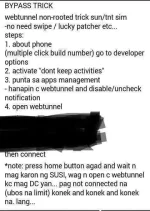
San mkkita ung no.2 (activate)?Ito o
Saan nga poh makikita un?Ibig sabihin yu lagyan mo ng Mark yun Don't keep activities
benjie42091
Fanatic
1. Go to developers option
"ON" Do not keep Activities
(Press build number 5-8times more.. in the "About Phone" if there's no Developers Option)
2. Go to app manager and find web tunnel.
"Clear cache", "forced stop"
3. Open web Tunnel. After you see the "AUTHENTICATING" Press "Home Button"
4. Do not open web tunnel. It will be disconnecting.
"ON" Do not keep Activities
(Press build number 5-8times more.. in the "About Phone" if there's no Developers Option)
2. Go to app manager and find web tunnel.
"Clear cache", "forced stop"
3. Open web Tunnel. After you see the "AUTHENTICATING" Press "Home Button"
4. Do not open web tunnel. It will be disconnecting.
Wla aqng dev. Option sir. Ung sa build number. Taz ok developer na daw aq1. Go to developers option
"ON" Do not keep Activities
(Press build number 5-8times more.. in the "About Phone" if there's no Developers Option)
2. Go to app manager and find web tunnel.
"Clear cache", "forced stop"
3. Open web Tunnel. After you see the "AUTHENTICATING" Press "Home Button"
4. Do not open web tunnel. It will be disconnecting.
Any sim ba cia sir?
Jaymark123
Forum Veteran
salamat sa share
- Status
- Not open for further replies.
About this Thread
-
15Replies
-
1KViews
-
10Participants
Last reply from:
Keeeera
Keeeera
New Topics
-
LPB PISO WIFI HELP
- Started by -shutdown-
- Replies: 2
- 🚀 Freenet & Tunneling
-
DNS LOOPING IN LINUX V2RAY TUN
- Started by Hidedeath
- Replies: 1
- 🚀 Freenet & Tunneling
-
Unligo99 tiktok bypass to our ρáíd vpn avail na 50 a month
- Started by amber vpn
- Replies: 0
- 🚀 Freenet & Tunneling
-
MGa BOSS FREE VPN NA MAY PH SERVER PARA DITO SA AFRICA?
- Started by Junbiel 26
- Replies: 1
- 🚀 Freenet & Tunneling
-
PISOWIFI NO HULOG | (26-09-30) | NPV TUNNEL
- Started by Calcifeer
- Replies: 8
- 🚀 Freenet & Tunneling
-
[NOW WORKING] Youtube No Ads & Other Sites! via DNS
- Started by Lerps
- Replies: 35
- 🚀 Freenet & Tunneling
-
Free vpn can bypass captive portal
- Started by Darz2468
- Replies: 6
- 🚀 Freenet & Tunneling
-
Ano po gagawin pag ganto po?
- Started by jokejoke
- Replies: 3
- 🚀 Freenet & Tunneling
Trending Topics
-
-
-
-
ALL WIFI häçkING 5.4GHz and 2.4 GHZ With PCAP Logging ( For educational purposes only)
- PHC H3XGAMING
Replies: 156 -
-
-
Online now
- Members online
- 280
- Guests online
- 9,999
- Total visitors
- 10,279