PH
PH

Audacity Overview
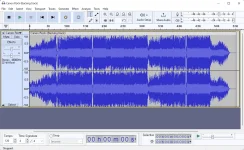
Audacity is a free, open-source, cross-platform audio software Developed by a group of volunteers as open source. The installation process runs quite fast and does not pose any problems, while the interface is pleasant and clean. It encompasses a menu bar, several buttons, and a pane to view the waveform of any uploaded item.
This utility features support for importing, processing, and exporting WAV, FLAC, AIFF, AU, and Ogg Vorbis files. Bundled with various plugins and effects, this software can help you with audio recording/playback, track mixing, and spectrum analysis.
Audacity is a free, easy-to-use, multi-track audio editor and recorder for Windows, Mac OS X, GNU/Linux, and other operating systems. The interface is translated into many languages.
This utility features support for importing, processing, and exporting WAV, FLAC, AIFF, AU, and Ogg Vorbis files. Bundled with various plugins and effects, this software can help you with audio recording/playback, track mixing, and spectrum analysis.
Audacity is a free, easy-to-use, multi-track audio editor and recorder for Windows, Mac OS X, GNU/Linux, and other operating systems. The interface is translated into many languages.
Features of Audacity
Record live audio.
Record computer playback on any Windows Vista or later machine.
Convert tapes and records into digital recordings or CDs.
Edit WAV, AIFF, FLAC, MP2, MP3 or Ogg Vorbis sound files.
AC3, M4A/M4R (AAC), WMA and other formats supported using optional libraries.
Cut, copy, splice or mix sounds together.
Numerous effects including change the speed or pitch of a recording.
Write your own plug-in effects with Nyquist.
Record computer playback on any Windows Vista or later machine.
Convert tapes and records into digital recordings or CDs.
Edit WAV, AIFF, FLAC, MP2, MP3 or Ogg Vorbis sound files.
AC3, M4A/M4R (AAC), WMA and other formats supported using optional libraries.
Cut, copy, splice or mix sounds together.
Numerous effects including change the speed or pitch of a recording.
Write your own plug-in effects with Nyquist.
System Requirements and Technical Details
Supported OS: Windows 11, Windows 10, Windows 8.1, Windows 7
RAM (Memory): 2 GB RAM (4 GB recommended)
Free Hard Disk Space: 200 MB or more
Mediafire Download Link


Download
Password: ranmanak
RAM (Memory): 2 GB RAM (4 GB recommended)
Free Hard Disk Space: 200 MB or more
Mediafire Download Link
Download
Password: ranmanak