 PH
PHcowboybebpo
Enthusiast
Hi! mga Ka-PH, this is my first share here I hope na makatulong ito. I'm not anymore active in any PH forum way back 2006 to 2016 since naging pamilyado na.
Please read carefully instruction nalang po, salamat.
I know na you can just use android Emulator app or Android OS for PC, this is just an alternative way.
Before we proceed installing Windows Subsystem for Android, make sure "Virtual Machine Platform" option is turned ON from Windows features.
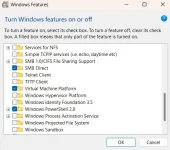
Double check if Virtualization is also turned on from your BIOS.
Note: WSA is not officially supported in the Philippines so we need to force install, please follow instruction.
To install WSA manually with PowerShell on Windows 11, use these steps:
Open the website store.rg-adguard.net.
Select the Productid option, paste this ID: 9p3395vx91nr, select the Slow option, and click the Check button.
Click the MicrosoftCorporationII.WindowsSubsystemForAndroid_2311.40000.4.0_neutral_~_8wekyb3d8bbwe.msixbundle 1.37 GB.

WSA direct download
Quick note: Bear in mind that the version number may differ depending on when you download the application. This also means that you need to update the PowerShell command accordingly.
Open Start.
Search for PowerShell, right-click the top result, and select the Run as administrator option.
Type the following command to change the directory to the folder with the Msixbundle file and press Enter:
cd C:\PATH\TO\Msixbundle
In the command, update the path with the location where you saved the package file.
Type the following command to install Windows Subsystem for Android on Windows 11 and press Enter:
In the command, update the app package name with the name of the file you have downloaded.
Once you complete the steps, the Windows Subsystem for Android and the Amazon Appstore app will install on your computer.
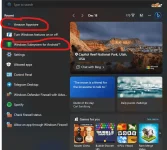
Once installed, restart your PC.
Now WSA is installed, you may now download WSATool from Microsoft Store. (this is the app that will handle APK installer)
You may also use other APK installer you desired. (WSATool) is what I'm using.
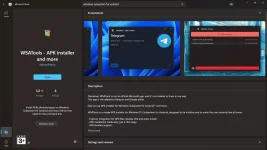
Open Windows Subsystem for Android from the Start Menu.
Go to Advanced Setting and turn on Developer mode.
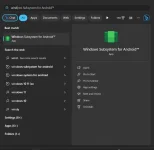
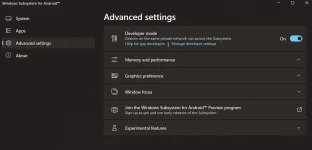
Once everything is done, you may now install android APK app, just double click or open with WSATools.
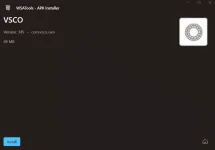
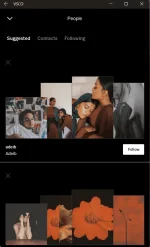
Note: I'm not sure if all APK would work, find it yourself.
I tried only VSCO and it works normal.
I did not discover this myself but I just created more detailed info on how to do it based on googling it and trying it myself.
Reply to this thread for any question and I will try to respond whenever I have time.
Enjoy!
Please read carefully instruction nalang po, salamat.
I know na you can just use android Emulator app or Android OS for PC, this is just an alternative way.
Before we proceed installing Windows Subsystem for Android, make sure "Virtual Machine Platform" option is turned ON from Windows features.
Double check if Virtualization is also turned on from your BIOS.
Note: WSA is not officially supported in the Philippines so we need to force install, please follow instruction.
To install WSA manually with PowerShell on Windows 11, use these steps:
Open the website store.rg-adguard.net.
Select the Productid option, paste this ID: 9p3395vx91nr, select the Slow option, and click the Check button.
Click the MicrosoftCorporationII.WindowsSubsystemForAndroid_2311.40000.4.0_neutral_~_8wekyb3d8bbwe.msixbundle 1.37 GB.
WSA direct download
Quick note: Bear in mind that the version number may differ depending on when you download the application. This also means that you need to update the PowerShell command accordingly.
Open Start.
Search for PowerShell, right-click the top result, and select the Run as administrator option.
Type the following command to change the directory to the folder with the Msixbundle file and press Enter:
cd C:\PATH\TO\Msixbundle
In the command, update the path with the location where you saved the package file.
Type the following command to install Windows Subsystem for Android on Windows 11 and press Enter:
Add-AppxPackage MicrosoftCorporationII.WindowsSubsystemForAndroid_2311.40000.4.0_neutral_~_8wekyb3d8bbwe.msixbundle
In the command, update the app package name with the name of the file you have downloaded.
Once you complete the steps, the Windows Subsystem for Android and the Amazon Appstore app will install on your computer.
Once installed, restart your PC.
Now WSA is installed, you may now download WSATool from Microsoft Store. (this is the app that will handle APK installer)
You may also use other APK installer you desired. (WSATool) is what I'm using.
Open Windows Subsystem for Android from the Start Menu.
Go to Advanced Setting and turn on Developer mode.
Once everything is done, you may now install android APK app, just double click or open with WSATools.
Note: I'm not sure if all APK would work, find it yourself.
I tried only VSCO and it works normal.
I did not discover this myself but I just created more detailed info on how to do it based on googling it and trying it myself.
Reply to this thread for any question and I will try to respond whenever I have time.
Enjoy!
 Support