 PH
PH
WinToUSB Overview
WinToUSB is the best Windows To Go Maker that allows you to install and run Windows operating system on a USB hard drive or USB flash drive, using an ISO image or CD/DVD drive as the source of installation. Starting from version 2.0, you can clone current Windows OS installation (Windows 7 or later) to a USB drive as a Windows To Go Workspace. WinToUSB also supports creating a bootable WinPE USB drive, it can help you transfer the contents of WinPE to a USB drive and make the drive bootable.
Key Features of WinToUSB
Easy-to-use wizard interface that provides step-by-step instructions for creating a Windows To Go USB drive.
Creation of Windows To Go from an ISO image file or CD/DVD drive.
Clone an existing Windows OS (Windows 7 or later) to a USB Drive as a Windows To Go Workspace.
Use of a Non-Enterprise Edition of Windows 10/8.1/8/7 to create Windows To Go Workspace.
Creation of Windows To Go on Non-Certified Windows To Go USB Drive.
Clone current Windows OS (Enterprise edition of Windows 10/8.1/8/7) to a USB drive as a Windows To Go Workspace
Clone current Windows OS which on a dynamic disk to a USB drive as a Windows To Go Workspace
Clone current Windows OS which on a USB disk (Windows To Go USB drive) to other USB drives as a Windows To Go Workspace
WinToUSB System Requirements
Below are the minimum system requirements for running the WinToUSB
Processor: | Intel® Pentium® processor 1GHz (32 bits or 64 bits) or above. |
RAM: | 1024 MB or more of RAM (2048 MB Recommended). |
Windows: | 11, 10, 8.1/8, 7. |
Space: | 1 GB available space. |
WinToUSB Screenshots:
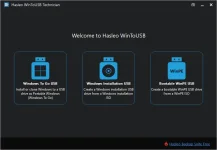
Follow the below instructions to activate your version of WinToUSB.
Run installer from “Setup” folder and complete the installation.
Close program completely (even from system tray) and Copy ρá†ch to program’s installation
Right click on ρá†ch and click “Run as administrator”
Click on “ρá†ch” (or cr@ck) button and select the main executable file (if required)
That’s it, Enjoy!
Download
ZIP PASS: Zuzanoo
ZIP PASS: Zuzanoo