Benvista PhotoZoom Pro Overview
PhotoZoom Pro 8 not only creates larger images than any other software (up to 1 million by 1 million pixels), it also produces higher quality results. PhotoZoom Pro 8 is equipped with S-Spline Max, a unique, award-winning image resize technology which excels at preserving clean edges, sharpness, and fine details. Even noisy, compressed originals can be enlarged successfully. Normally, noise and JPEG compression artifacts become disturbingly visible during enlargement. PhotoZoom Pro 8 however offers the tools to eliminate these distortions. You’ll be amazed by the amount of detail PhotoZoom Pro 8 is able to reveal.
PhotoZoom Pro 8 is extremely easy to use, and comes with various pre-defined settings. These settings can be manually fine-tuned as well. You can even put together your own resize profiles: compilations of your favorite resize method and size settings, which can be selected with a single click. When you often use the same settings, resize profiles will streamline your workflow.
Large quantities of images can be resized in one go, through batch processing. Multi-processor support and the improved GPU acceleration included with PhotoZoom Pro 8 ensure reduced processing time.
Optimized for both printing and on-screen purposes, PhotoZoom Pro 8 is an absolute must-have for anyone who wants to resize images at the highest possible quality.
Key Features of Benvista PhotoZoom Pro
Award-winning S-Spline Max image resize technology
Reveals fine image details at any size, with or without resizing your photo
Higher quality image enlargements & higher quality downsizing
Various presets for different types of photos and graphics
Advanced fine-tuning tools: create your own presets and resize profiles
Reduces (JPEG) compression artifacts and noise from low quality originals
Batch processing
Multi-processor support and GPU acceleration
Powerful crop tool
Stand-alone application, Photoshop compatible plug-in, and Lightroom integration
Extreme enlargements: up to 1 million by 1 million pixels!
Extensive support for high-end images
Split screen previewing: compare different resize methods at a glance
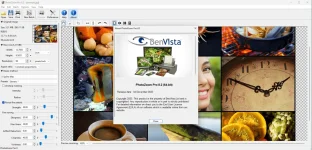
Benvista PhotoZoom Pro Screenshots:
==============
Instructions:
=============
1. Install software using given installer (in Setup folder)
2. Close program if running (Even from system tray)
3. Extract "Crack.zip" file and Copy its content to program's installation folder (confirm replacing, if asked)
4. That's it, Enjoy!
 PH
PH