PH
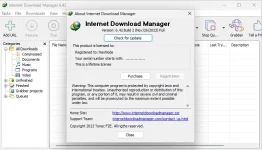
PHInternet Download Manager (IDM) v6.42 Build 2 + P@tch

Internet Download Manager has a smart download logic accelerator that features intelligent dynamic file segmentation and safe multipart downloading technology to accelerate your downloads. Unlike other download accelerators and managers that segment files before downloading starts, Internet Download Manager segments downloaded files dynamically during download process.
INSTRUCTIONS
1. Run installer from "Setup" folder and complete the installation.
2. Close program completely (even from system tray)
3. Extract P@tch rar and then right click on p@tch and click "Run as administrator"
4. Click on "Craack" button
5. That's it, Enjoy!
LINKS
You do not have permission to view the full content of this post. Log in or register now.
Internet Download Manager has a smart download logic accelerator that features intelligent dynamic file segmentation and safe multipart downloading technology to accelerate your downloads. Unlike other download accelerators and managers that segment files before downloading starts, Internet Download Manager segments downloaded files dynamically during download process.
What's new in version 6.42 Build 2
(Released: November 26, 2023)- IDM 6.42 build 1 has the following bug. If you make a Full uninstall and then install IDM again, the integration into the browsers cannot be turned on. IDM 6.42 build 2 fixes this problem, but you need to make sure that "IDM Integration module" extension/add-on is turned on in your browser(s) after installing this version of IDM.
INSTRUCTIONS
1. Run installer from "Setup" folder and complete the installation.
2. Close program completely (even from system tray)
3. Extract P@tch rar and then right click on p@tch and click "Run as administrator"
4. Click on "Craack" button
5. That's it, Enjoy!
LINKS
You do not have permission to view the full content of this post. Log in or register now.