 PH
PHUSB Safely Remove v7.0.4.1319 + P@tch-K3ygen
USB Safely Remove Overview
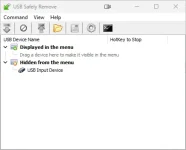
USB Safely Remove is a utility for effortless and speedy disconnection of any removable devices. Not only does it save time, but it ensures that all data remains on a device when it is unplugged. Safely Remove is a system utility designed for quick and safely stopping USB Flash Drives connected to your computer. With this utility you can safely stop and remove USB Flash Drives much faster then using “Safely remove hardware”” icon in the system tray.
Key Features of USB Safely Remove
Much more convenience
Safely remove a device via the convenient menu or a hotkey, remove unneeded devices from the menu, setup icons or names for the devices. Besides even if you stop a device accidentally you can return it in a click.
Save data and devices
Even if the device cannot be safely removed the program will show you locking processes and allow you to forcibly stop it so that you avoid incorrect removal of the device. Besides the program can power off the devices in Windows Vista\7.
Automate and speed up work
Use command line tool in your scripts or a powerful autorun manager to automate backup to external drives, check for viruses and many more daily tasks.
Organize drive letters
Clean up your drive letter list by automatic hiding letters of unused card reader slots, fix drive letters to a specific device or even forbid some letters from assigning to external drives for backup purposes or thirdparty software.
INSTRUCTIONS
1. Disable internet and install the program (use given setup)
2. Close the program completely (Close service running in task manager)
3. Run K3ygen as administrator and click on P@tch then select main executable file
4. Generate Serial, Run Program and Register it with Serial
5. That's it, Enjoy!
LINKS
You do not have permission to view the full content of this post. Log in or register now.
USB Safely Remove Overview
USB Safely Remove is a utility for effortless and speedy disconnection of any removable devices. Not only does it save time, but it ensures that all data remains on a device when it is unplugged. Safely Remove is a system utility designed for quick and safely stopping USB Flash Drives connected to your computer. With this utility you can safely stop and remove USB Flash Drives much faster then using “Safely remove hardware”” icon in the system tray.
Key Features of USB Safely Remove
Much more convenience
Safely remove a device via the convenient menu or a hotkey, remove unneeded devices from the menu, setup icons or names for the devices. Besides even if you stop a device accidentally you can return it in a click.
Save data and devices
Even if the device cannot be safely removed the program will show you locking processes and allow you to forcibly stop it so that you avoid incorrect removal of the device. Besides the program can power off the devices in Windows Vista\7.
Automate and speed up work
Use command line tool in your scripts or a powerful autorun manager to automate backup to external drives, check for viruses and many more daily tasks.
Organize drive letters
Clean up your drive letter list by automatic hiding letters of unused card reader slots, fix drive letters to a specific device or even forbid some letters from assigning to external drives for backup purposes or thirdparty software.
INSTRUCTIONS
1. Disable internet and install the program (use given setup)
2. Close the program completely (Close service running in task manager)
3. Run K3ygen as administrator and click on P@tch then select main executable file
4. Generate Serial, Run Program and Register it with Serial
5. That's it, Enjoy!
LINKS
You do not have permission to view the full content of this post. Log in or register now.