 PH
PH-
Welcome to PHCorner Forums! Sign up for free to unlock full access and exclusive privileges, including:
- Asking questions about computer and mobile issues
- Discovering internet tips for your mobile network and computer
You are using an out of date browser. It may not display this or other websites correctly.
You should upgrade or use an alternative browser.
You should upgrade or use an alternative browser.
👨🏫 Tutorial Guide me pano mag install ng microsoft office na hindi na stock ang installation
- Thread starter DataDynamo
- Start date
DataDynamo
Elite
Pano ito boss anong gagawin ko?Try mo e run yung parang checker ng Massgrave kung may license na installed sa device mo, nakikita jan kung may dating naka install eh
Di nga boss mainstall nag foforce close kapag ni run ko na yung setup 64extract iso files. locate setup 64, install. then wait after. pag naka install na balik ka dito sa ac†ïvâ†ør.
You do not have permission to view the full content of this post. Log in or register now.
with complete guide na yan jan ac†ïvâ†ør.
I do recommend na connected ka parin sa internet ang device pag mag install. kahit offline installer.
Check mo paps yung nisend na link ng Massgrave, may instructions dun na ginagamit ay PowerShellPano ito boss anong gagawin ko?
Di nga boss mainstall nag foforce close kapag ni run ko na yung setup 64
DataDynamo
Elite
ito ba boss?Check mo paps yung nisend na link ng Massgrave, may instructions dun na ginagamit ay PowerShell
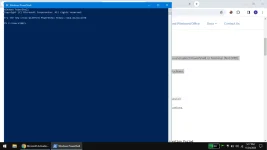
Tas ito gagawin ko?
- On Windows 8.1/10/11, right-click on the Windows start menu and select PowerShell or Terminal (Not CMD).
- Copy and paste the code below and press enter
irm You do not have permission to view the full content of this post. Log in or register now. | iex - You will see the activation options. Follow the on-screen instructions.
- That’s all.
should be good pag tapos na fix ng ms scrubber yung registry files etc. mostly di yan mawala need din connected sa internet yung device kahit offline installation. first no need to activate first di pa installed ang office. later na yung activation.Pano ito boss anong gagawin ko?
Di nga boss mainstall nag foforce close kapag ni run ko na yung setup 64
DataDynamo
Elite
Yon nga po papano mag install ng office hahahahaha nag foforce close po kasi yung microsoftshould be good pag tapos na fix ng ms scrubber yung registry files etc. mostly di yan mawala need din connected sa internet yung device kahit offline installation. first no need to activate first di pa installed ang office. later na yung activation.
Should I go for this mga boss?ito ba boss?
View attachment 2824235
Tas ito gagawin ko?
- On Windows 8.1/10/11, right-click on the Windows start menu and select PowerShell or Terminal (Not CMD).
- Copy and paste the code below and press enter
irm You do not have permission to view the full content of this post. Log in or register now. | iex- You will see the activation options. Follow the on-screen instructions.
- That’s all.
pag di nag proceed may mga underlying issues yan. first you could try to do is reinstall your os or windows system restore to date na di pa nag attempt install ng office.
I could clearly see na gumagamit ng mod os, based on screenshots. possible din na dahil sa mod os.
I could clearly see na gumagamit ng mod os, based on screenshots. possible din na dahil sa mod os.
DataDynamo
Elite
Ayon patay wari ko di ko na kaya itong windows keneme system hahahahapag di nag proceed may mga underlying issues yan. first you could try to do is reinstall your os or windows system restore to date na di pa nag attempt install ng office.
I could clearly see na gumagamit ng mod os, based on screenshots. possible din na dahil sa mod os.
Pero ni try ko to mga boss
Custom Installation Guide
First, you’ll need to clear previous installations of Office. You can skip this if Office has never been installed on the machine before:- Uninstall Office with the App and Features option in Windows settings.
- Run OfficeScrubber.cmd file from You do not have permission to view the full content of this post. Log in or register now. by abbodi1406 and select [R] Remove all Licenses option.
- Download You do not have permission to view the full content of this post. Log in or register now. (ODT)
- Copy the downloaded setup.exe file to the root of the C drive, i.e. C:\setup.exe
- Go to You do not have permission to view the full content of this post. Log in or register now.
- If you want Retail Office then select Microsoft 365 Apps for enterprise in the office suites section.
- If you want Volume Office then select Office LTSC Professional Plus 2021 - Volume License in the office suites section. (Don’t select the SPLA version)
- You can add Visio and Project apps if you need them. Don’t select language that is You do not have permission to view the full content of this post. Log in or register now. if you are installing those apps.
- Customize other things and leave settings as default if you don’t understand something.
- Once you go through all the options, click on the export button, select “Keep Current Settings” option and it will download a file named Configuration.xml
- Copy the downloaded Configuration.xml file to the root of the C drive, i.e. C:\Configuration.xml
- Open the command prompt as admin and run the below commands
cd /d C:\
setup.exe /configure Configuration.xml
Ayaw paden nalabas lang din yung microsoft tas nag foforce close lang din
online installation yan mas matagal, pag nawala yung office installer. same conclusion parin.Ayon patay wari ko di ko na kaya itong windows keneme system hahahaha
Pero ni try ko to mga boss
Custom Installation Guide
First, you’ll need to clear previous installations of Office. You can skip this if Office has never been installed on the machine before:
Once you’re done:
- Uninstall Office with the App and Features option in Windows settings.
- Run OfficeScrubber.cmd file from You do not have permission to view the full content of this post. Log in or register now. by abbodi1406 and select [R] Remove all Licenses option.
It will now download and install Office. You can activate it with your preferred method.
- Download You do not have permission to view the full content of this post. Log in or register now. (ODT)
- Copy the downloaded setup.exe file to the root of the C drive, i.e. C:\setup.exe
- Go to You do not have permission to view the full content of this post. Log in or register now.
- If you want Retail Office then select Microsoft 365 Apps for enterprise in the office suites section.
- If you want Volume Office then select Office LTSC Professional Plus 2021 - Volume License in the office suites section. (Don’t select the SPLA version)
- You can add Visio and Project apps if you need them. Don’t select language that is You do not have permission to view the full content of this post. Log in or register now. if you are installing those apps.
- Customize other things and leave settings as default if you don’t understand something.
- Once you go through all the options, click on the export button, select “Keep Current Settings” option and it will download a file named Configuration.xml
- Copy the downloaded Configuration.xml file to the root of the C drive, i.e. C:\Configuration.xml
- Open the command prompt as admin and run the below commands
cd /d C:\
setup.exe /configure Configuration.xml
Ayaw paden nalabas lang din yung microsoft tas nag foforce close lang din
DataDynamo
Elite
Hays pano na kaya kapag yung yung mga installer ng nandito sa PHC na stock lang sa installation hayshaysonline installation yan mas matagal, pag nawala yung office installer. same conclusion parin.
Gusto ko lang naman sana maging latest Office netong laptop nagka lintek lintek naman hayshays hahahaha
You do not have permission to view the full content of this post.
Log in or register now.
download then open cmd script. scrub all option.
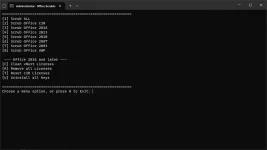
try C R T U options after. restart device then try installing again.
Setup64 or Setup32. both will work just fine.
download then open cmd script. scrub all option.
try C R T U options after. restart device then try installing again.
Setup64 or Setup32. both will work just fine.
DataDynamo
Elite
Copy boss teka gawin ko yanYou do not have permission to view the full content of this post. Log in or register now.
download then open cmd script. scrub all option.
View attachment 2824261
try C R T U options after. restart device then try installing again.
Setup64 or Setup32. both will work just fine.
Pati po ba yung scrub all? After nyan which C R T U na?
x64 po nasa about device nito e kaya x64 po bubuksan ko?
fix attempt yan para malaman kung maayos pa.Copy boss teka gawin ko yan
Pati po ba yung scrub all? After nyan which C R T U na?
x32 or x64 depende kasi yan sa cpu pero both working naman or pwede din yung installer na setup sa extracted files. mag auto adjust lang yan depende sa os/device.x64 po nasa about device nito e kaya x64 po bubuksan ko?
DataDynamo
Elite
Copy boss tapos na ako don sa C R T U. Sunod ko na yung pina download mo sakin files na setup x64 na extracted pifix attempt yan para malaman kung maayos pa.
x32 or x64 depende kasi yan sa cpu pero both working naman or pwede din yung installer na setup sa extracted files. mag auto adjust lang yan depende sa os/device.
yep to insure na removed mga existing office files.Copy boss tapos na ako don sa C R T U. Sunod ko na yung pina download mo sakin files na setup x64 na extracted pi
DataDynamo
Elite
Existing office files like what boss? Yung mga docx file ganan?yep to insure na removed mga existing office files.
yung mga previous installation files/registry ng office.Existing office files like what boss? Yung mga docx file ganan?
DataDynamo
Elite
Saan makikita yan boss?yung mga previous installation files/registry ng office.
Kapag ni-run mo yung scrubber, at ni-select mo yung scrub all, kusa nang hahanapin nun at ire-remove yang mga files/registry na yan. Wala ka nang gagawin kundi hintayin matapos mag-scrub.Saan makikita yan boss?
DataDynamo
Elite
Edi goods boss okay na po natapos ko na yang scrub all. Install na po ulit ako balitaan ko kayoKapag ni-run mo yung scrubber, at ni-select mo yung scrub all, kusa nang hahanapin nun at ire-remove yang mga files/registry na yan. Wala ka nang gagawin kundi hintayin matapos mag-scrub.
Ganon padin mga boss edgecraft Arjien nag foforce close paden yung Setup kapag binubuksan ko ayaw nya mag tuloy ba nag foforce close siguro 1sec wala na kahit paulit ulitin mong iRun
Similar threads
About this Thread
-
162Replies
-
2KViews
-
22Participants
Last reply from:
usersusername
usersusername
New Topics
-
Blackmagic Design Fusion Studio 21.1.2 (x64) Multilingual
- Started by PremiumCourses
- Replies: 1
- ⚙️ PC Apps, Themes, Tools
-
-
Autocad 2021 with crack
- Started by Newbieee
- Replies: 0
- ⚙️ PC Apps, Themes, Tools
-
OpenPlant Project Administrator 2026 v26.00.02.10 Win x64
- Started by PremiumCourses
- Replies: 0
- ⚙️ PC Apps, Themes, Tools
-
Lattice Semiconductor Diamond 3.14
- Started by PremiumCourses
- Replies: 0
- ⚙️ PC Apps, Themes, Tools
-
Hexagon Vero AlphaCAM 2026.2 Build 104 Win x64
- Started by PremiumCourses
- Replies: 0
- ⚙️ PC Apps, Themes, Tools
-
Internet Download Manager 6.43 Build 16 | 14.9 MB
- Started by DLBB
- Replies: 1
- ⚙️ PC Apps, Themes, Tools
-
SketchUp Pro 2027 27.0.264 | 2.12 GB
- Started by DLBB
- Replies: 1
- ⚙️ PC Apps, Themes, Tools
Trending Topics
Online now
- Members online
- 1,009
- Guests online
- 10,805
- Total visitors
- 11,814