Good day! Yes, you can definitely ask your question about accessing pisowifi using port, telnet, and SSH in Termux.
To access pisowifi using port, telnet, and SSH in Termux, you would need to follow these steps:
1. Install Termux: Termux is a terminal emulator for Android that provides a Linux environment. You can download it from the Google Play Store.
2. Open Termux: Once installed, open the Termux app on your Android device.
3. Update and upgrade packages: Before proceeding, it is recommended to update and upgrade the Termux packages. Use the following command to do so:
Code:
apt update && apt upgrade
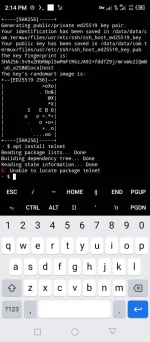
4. Install necessary packages: To access pisowifi, you may need to install additional packages such as telnet and SSH. To install these packages, use the following commands:
- For telnet:
- For SSH:
5. Access pisowifi using telnet: If pisowifi allows access via telnet, you can use the following command to connect to it:
Code:
telnet <pisowifi-ip-address> <port-number>
Replace
<pisowifi-ip-address> with the IP address of the pisowifi device, and
<port-number> with the port number assigned for telnet access.
6. Access pisowifi using SSH: If pisowifi allows access via SSH, you can use the following command to connect to it:
Code:
ssh <pisowifi-username>@<pisowifi-ip-address> -p <port-number>
Replace
<pisowifi-username> with your username for pisowifi,
<pisowifi-ip-address> with the IP address of the pisowifi device, and
<port-number> with the port number assigned for SSH access.
Please note that the exact steps and commands may vary depending on your specific setup and requirements. It is also important to have the necessary credentials (username, password) for accessing pisowifi.
I hope this helps! If you have any further questions or need clarification, feel free to ask.
 PH
PH