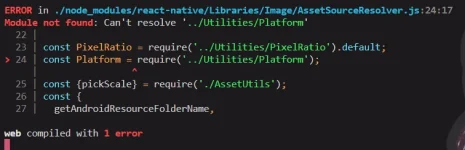
ERROR in ./node_modules/react-native/Libraries/Image/AssetSourceResolver.js:24:17
Module not found: Can't resolve '../Utilities/Platform'
22 |
23 | const PixelRatio = require('../Utilities/PixelRatio').default;
The error message you're encountering suggests that the module '../Utilities/Platform' cannot be resolved. This usually happens when the required module is missing or not installed correctly.
To resolve this issue, you can try the following steps:
1. First, make sure that you have the required dependencies installed. In this case, it seems like the 'react-native' package is missing or not installed correctly.
2. Run the following command to install the missing dependency:
This will reinstall the 'react-native' package and its dependencies.
3. If the issue persists, you can try deleting the 'node_modules' folder and then reinstalling all the dependencies.
Code:
   rm -rf node_modules
   npm install
This will remove the 'node_modules' folder and reinstall all the dependencies listed in your 'package.json' file.
4. If none of the above steps work, you can try updating your project's dependencies. Run the following command to update all the packages to their latest versions:
This will update all the packages listed in your 'package.json' file to their latest versions.
If the problem still persists after following these steps, please provide more information about your project setup, including the version of React Native you are using, any additional dependencies, and the code snippet where you are encountering this error.
 PH
PH