PH
PHhow to unli force name
important note :
- do not resell this tutorial because it’s totally all free‚ also make sure the name you will be change is valid because not all characters are accepted by facebook.
requirements :
first step :
download “kiwi browser” through your playstore
second step :
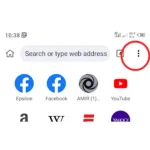
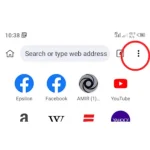
click on the three dot button in the top right corner (kiwi browser ah)
third step :
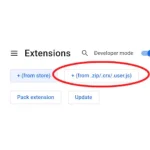
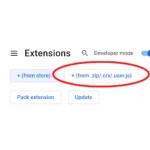
click the “extension” tab and click the “+(from .zip/ .crx/ .user.js)” button
fifth step :
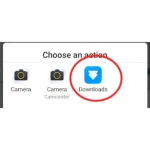
select the “download” folder that appears on your screen
sixth step :
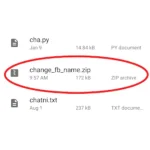
go to your storage path and add the zip file from the download link was given earlier
seventh step :
after adding the extension you should’ve now login on “facebook” using kiwi browser (open kayo ng tab tas itype niyo facebook.com tas ilog in niyo credentials niyo)
eighth step :
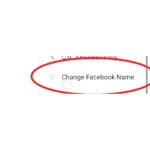
after logging in‚ click on the three dot button‚ find and select the “change facebook name”
ninth step :
after clicking it‚ enter your first name into first box‚ middle name for the second box‚ last name for the third box (leaving it empty is optional)
tenth step :
click on “change your name” and press ok to change your facebook name
important note :
- do not resell this tutorial because it’s totally all free‚ also make sure the name you will be change is valid because not all characters are accepted by facebook.
requirements :
- kiwi browser
- extension file (You do not have permission to view the full content of this post. Log in or register now.)
- download the file before proceeding the steps
- reading comprehension
- patience
first step :
download “kiwi browser” through your playstore
second step :
click on the three dot button in the top right corner (kiwi browser ah)
third step :
click the “extension” tab and click the “+(from .zip/ .crx/ .user.js)” button
fifth step :
select the “download” folder that appears on your screen
sixth step :
go to your storage path and add the zip file from the download link was given earlier
seventh step :
after adding the extension you should’ve now login on “facebook” using kiwi browser (open kayo ng tab tas itype niyo facebook.com tas ilog in niyo credentials niyo)
eighth step :
after logging in‚ click on the three dot button‚ find and select the “change facebook name”
ninth step :
after clicking it‚ enter your first name into first box‚ middle name for the second box‚ last name for the third box (leaving it empty is optional)
tenth step :
click on “change your name” and press ok to change your facebook name