❓ Help SUM FORMULA

Trident_muh

Honorary Poster
Hello please help.

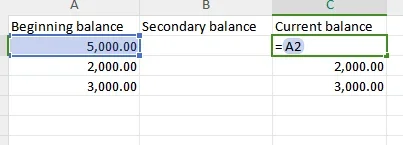
if second column has no value, get the value of first column and display the result in third column
first column always have value, 3rd column will always display the value of first column, but it will change when second column has value.
1694000344216.webp
 
Solution
🤖
Sure, I'd be happy to help!

To achieve this, you can use a formula in the third column that checks if the second column has a value. If the second column is empty, the formula will display the value from the first column. However, if the second column has a value, the formula will display the value from the second column.

Here's an example formula you can use in the third column:

Code:
=IF(B2="", A2, B2)

Assuming the first row is the header row, this formula checks if cell B2 is empty. If it is, it displays the value from cell A2 in the third column. Otherwise, it displays the value from cell B2.

You can drag this formula down to apply it to the rest of the rows in the third column.

I hope this helps! Let me know if you have any...
Sure, I'd be happy to help!

To achieve this, you can use a formula in the third column that checks if the second column has a value. If the second column is empty, the formula will display the value from the first column. However, if the second column has a value, the formula will display the value from the second column.

Here's an example formula you can use in the third column:

Code:
=IF(B2="", A2, B2)

Assuming the first row is the header row, this formula checks if cell B2 is empty. If it is, it displays the value from cell A2 in the third column. Otherwise, it displays the value from cell B2.

You can drag this formula down to apply it to the rest of the rows in the third column.

I hope this helps! Let me know if you have any further questions.
 
Solution
Sure, I'd be happy to help!

To achieve this, you can use a formula in the third column that checks if the second column has a value. If the second column is empty, the formula will display the value from the first column. However, if the second column has a value, the formula will display the value from the second column.

Here's an example formula you can use in the third column:

Code:
=IF(B2="", A2, B2)

Assuming the first row is the header row, this formula checks if cell B2 is empty. If it is, it displays the value from cell A2 in the third column. Otherwise, it displays the value from cell B2.

You can drag this formula down to apply it to the rest of the rows in the third column.

I hope this helps! Let me know if you have any further questions.
Thank you so much!
 

About this Thread

  • 3
    Replies
  • 292
    Views
  • 1
    Participants
Last reply from:
Unknown user

Trending Topics

Online now

Members online
1,128
Guests online
1,034
Total visitors
2,162

Forum statistics

Threads
2,273,802
Posts
28,951,821
Members
1,234,964
Latest member
Mightyfriedriceee
Back
Top