 PH
PHIcecream Ebook Reader Pro v6.41 P@tch
Icecream Ebook Reader Pro Overview
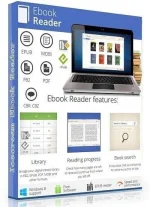
Meet Icecream Ebook Reader, one of the best free EPUB readers that transforms your computer screen into a convenient top-notch ebook reader. The tool enables you read ebooks in EPUB, MOBI, DJVU, FB2 and other popular formats. Manage digital library on your PC or Windows-based laptop. This program also features the ability to turn pages, use bookmarks, search your library, track reading progress and much more.
Key Features of Icecream Ebook Reader Pro
Library
Manage your digital ebook library in FB2, EPUB, PDF, MOBI and other formats.
Reading progress
Check how many pages are left to read and continue from where you left off.
Book search
Find a book that you’re looking for either by author or title.
Fullscreen mode
Make the most of your epub reader in a full screen mode.
Bookmarks
Use bookmarks to revisit the most memorable parts of your book.
Night mode
Read in low light or no lighting at all.
Book mode
Transform your entire screen into a real book for maximum comfort.
Instructions
1. Run installer from "Setup" folder and complete the installation.
2. Close program completely (even from system tray) and Copy p@tch to program's installation
3. Right click on p@tch and click "Run as administrator"
4. Click on "P@tch" (or craack) button and select the main executable file (if required)
5. That's it, Enjoy!
LINKS
You do not have permission to view the full content of this post. Log in or register now.
Icecream Ebook Reader Pro Overview
Meet Icecream Ebook Reader, one of the best free EPUB readers that transforms your computer screen into a convenient top-notch ebook reader. The tool enables you read ebooks in EPUB, MOBI, DJVU, FB2 and other popular formats. Manage digital library on your PC or Windows-based laptop. This program also features the ability to turn pages, use bookmarks, search your library, track reading progress and much more.
Key Features of Icecream Ebook Reader Pro
Library
Manage your digital ebook library in FB2, EPUB, PDF, MOBI and other formats.
Reading progress
Check how many pages are left to read and continue from where you left off.
Book search
Find a book that you’re looking for either by author or title.
Fullscreen mode
Make the most of your epub reader in a full screen mode.
Bookmarks
Use bookmarks to revisit the most memorable parts of your book.
Night mode
Read in low light or no lighting at all.
Book mode
Transform your entire screen into a real book for maximum comfort.
Instructions
1. Run installer from "Setup" folder and complete the installation.
2. Close program completely (even from system tray) and Copy p@tch to program's installation
3. Right click on p@tch and click "Run as administrator"
4. Click on "P@tch" (or craack) button and select the main executable file (if required)
5. That's it, Enjoy!
LINKS
You do not have permission to view the full content of this post. Log in or register now.