 PH
PHastrophilehuwan
Leecher
I'm not sure if sa akin lang pero di ako makapag login sa BPI ko. It can still detect that my device is rooted kahit ok naman yung pagka-hide ko.
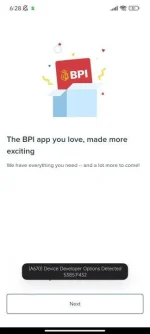
Already tried that but still doesn't work. I'll update soon once I was able to use Magisk Delta. They might have a better hide capabilities. Arte kasi ni BPI eh.(A670) Device Developer Options Detected
My wife's Android phone also had this issue with the new BPI app. Her device only had "Developer options" enabled but no Magisk installed. However, when "Developer options" was disabled (i.e. toggled to "Off"), the BPI app opened and functioned normally as it should.
Another workaround would be using the older version of the BPI app (confirmed working as of this writing) but who knows until when it's going to work. It also may be less secure (since it will no longer be updated/maintained) as users are encouraged to switch & use the new version instead.
 Gigil na talaga ako sa BPI, pag galing sa web, bawal. Hayst, BPI Online na lang talaga.
Yes, but I use Play Intergrity Fix module.Have you, by any chance, already tried Universal SafetyNet Fix (Magisk module)?
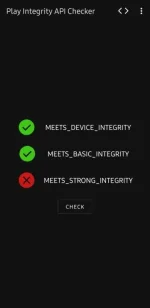 Ok naman Integrity ko. I passed Devices and Basic.
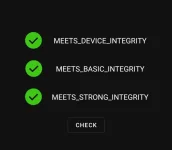
Perhaps the new BPI app needs/requires ALL 3 to be met.Yes, but I use Play Intergrity Fix module.
View attachment 2732031Ok naman Integrity ko. I passed Devices and Basic.
Yesssss, the latest.Perhaps the new BPI app needs/requires ALL 3 to be met.
Are you using the latest PlayIntegrityFix_V7.4?
Maybe you're missing some additional module/s to work along with Play Integrity Fix?Yesssss, the latest.
i downloaded the module Play Integrity Fix v7.4.Maybe you're missing some additional module/s to work along with Play Integrity Fix?
Perhaps the new BPI app wants your device to pass all integrity checks like so:
View attachment 2732508