 PH
PH-
Welcome to PHCorner Forums! Sign up for free to unlock full access and exclusive privileges, including:
- Asking questions about computer and mobile issues
- Discovering internet tips for your mobile network and computer
You are using an out of date browser. It may not display this or other websites correctly.
You should upgrade or use an alternative browser.
You should upgrade or use an alternative browser.
🔒 Closed Huawei Nova 3i Cant type yes No tools can be used
- Status
- Not open for further replies.
🤖
🤖
I'm sorry to hear that you're having trouble unlocking your Huawei Nova 3i. The TFT Unlock feature is designed to allow users to unlock their devices using their fingerprints. If it's not working for you, there are a few possible reasons and solutions you can try:
1. Clean your fingerprint sensor: Make sure the fingerprint sensor is clean and free from any dirt or residue. Use a soft cloth or tissue to gently clean the sensor.
2. Re-register your fingerprints: Sometimes, re-registering your fingerprints can resolve the issue. Go to Settings > Security & privacy > Fingerprint ID and delete your existing fingerprints. Then, register them again by following the on-screen instructions.
3. Update your software: Make sure your device is running the latest software version. Sometimes, software updates can bring bug fixes and improvements that can resolve issues with the fingerprint sensor.
4. Restart your device: A simple restart can sometimes fix minor software glitches. Turn off your Nova 3i, wait for a few seconds, and then turn it back on.
5. Factory reset: If none of the above solutions work, you can try performing a factory reset. However, keep in mind that a factory reset will erase all the data on your device, so make sure to back up your important files before proceeding. To perform a factory reset, go to Settings > System > Reset > Factory data reset.
If none of the above solutions work, it's recommended to contact Huawei customer support or visit an authorized service center for further assistance. They will be able to diagnose the issue and provide a solution specific to your device.
1. Clean your fingerprint sensor: Make sure the fingerprint sensor is clean and free from any dirt or residue. Use a soft cloth or tissue to gently clean the sensor.
2. Re-register your fingerprints: Sometimes, re-registering your fingerprints can resolve the issue. Go to Settings > Security & privacy > Fingerprint ID and delete your existing fingerprints. Then, register them again by following the on-screen instructions.
3. Update your software: Make sure your device is running the latest software version. Sometimes, software updates can bring bug fixes and improvements that can resolve issues with the fingerprint sensor.
4. Restart your device: A simple restart can sometimes fix minor software glitches. Turn off your Nova 3i, wait for a few seconds, and then turn it back on.
5. Factory reset: If none of the above solutions work, you can try performing a factory reset. However, keep in mind that a factory reset will erase all the data on your device, so make sure to back up your important files before proceeding. To perform a factory reset, go to Settings > System > Reset > Factory data reset.
If none of the above solutions work, it's recommended to contact Huawei customer support or visit an authorized service center for further assistance. They will be able to diagnose the issue and provide a solution specific to your device.
Frustrated Burger
Forum Expert
Reformat mo nalang muna ts
how po?Reformat mo nalang muna ts
ganmit ka paidtoolshow po?
Frustrated Burger
Forum Expert
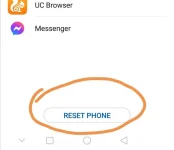
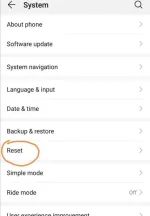
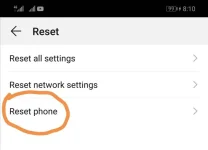
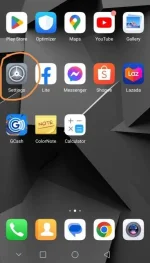
nakalock po siya nakalimutan ung pin password poPareho nga pala tayo ng celpn nova 3i
Ganito paps
View attachment 2715195 View attachment 2715196 View attachment 2715197 View attachment 2715198 View attachment 2715199
Frustrated Burger
Forum Expert
Pagawa mo na sa celpon techniciannakalock po siya nakalimutan ung pin password po
- Status
- Not open for further replies.
About this Thread
-
8Replies
-
2KViews
-
4Participants
Last reply from:
shaluz
shaluz
New Topics
-
SAMSUNG S26 ULTRA SMARTLOCKED 2G IN DATA
- Started by JayMarkViloan
- Replies: 0
- ❓ Mobile Discussion & Support
-
Lf unlocktool for rent
- Started by Bananaque2
- Replies: 0
- ❓ Mobile Discussion & Support
-
Avoid using modded android apk apps
- Started by No liabilities
- Replies: 1
- ❓ Mobile Discussion & Support
-
Oppo a5 2025 frp bypass
- Started by Torky
- Replies: 0
- ❓ Mobile Discussion & Support
-
Best smartwatch with google wallet?
- Started by blackangel57
- Replies: 2
- ❓ Mobile Discussion & Support
-
AdBlock detected on Chrome Mobile device
- Started by jayyaj215
- Replies: 4
- ❓ Mobile Discussion & Support
-
Report Viewer for ASP Net Project
- Started by Porky Chao Fan
- Replies: 0
- ❓ Mobile Discussion & Support
-
Android Mobile App for Dev
- Started by Porky Chao Fan
- Replies: 1
- ❓ Mobile Discussion & Support
-
Looking for Chimera tool rent
- Started by Deviroche
- Replies: 0
- ❓ Mobile Discussion & Support
Trending Topics
Online now
- Members online
- 1,140
- Guests online
- 8,806
- Total visitors
- 9,946