PH
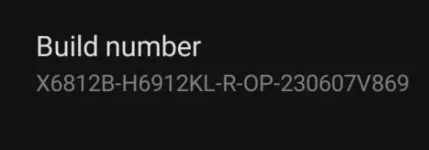
PHGinawa ko tong tutorial nato dahil people are still reacting to my post
"Infinix Hot 11s boot.img file"
NOTICE BEFORE ROOTING YOUR PHONE
All your phone memory will be deleted so make sure you made a back up
THINGS YOU NEED
Computer, cable for your phone to connect to the computer (you can use your charger cable)
QUICK DISCLAIMER
If you did not carefully follow the guide and somewhat bricked your phone then its your fault and your fault ONLY and its your ignorance that put you there.
BUT if this somewhat happened dont be afraid to ask me questions and maybe i can help BUT I CANT GUARANTEE THAT I CAN HELP YOU FIX YOUR PHONE
1. Unlock your bootloader and enable USB debugging you can do this by going to settings->My phone->Click build number until developer options open->Go back to the main settings->Go to System->Developer options->Click OEM unlocking and Click also the USB debugging.
2. Install adb on your computer (don't know how? try reading this)
(You do not have permission to view the full content of this post. Log in or register now.)
this will teach you how to install adb
3. Install magisk apk on your phone (You do not have permission to view the full content of this post. Log in or register now.)
4. NOW THE HARD PART find your infinix hot 11s firmware and that exact firmware only cause if you put something else it could brick your phone
5. If you found and already downloaded it then good you need to open it and find the boot.img file thats what you only need.
6. Connect your phone to the computer using the cable and put the boot.img file on your phone then disconnect your phone from the computer and open Magisk app then ρá†ch the boot.img file if finished patching you should be able to get an patched boot.img file, connect your phone in the pc and create an empty folder in the desktop then put the boot.img file on the computer in the new folder you created.
7. Dont disconnect your phone yet open the folder containing the patched boot.img file rename it to 123.img (or whatever) and in that folder open CMD (Command prompt)
8. In the CMD type
adb devices
(you should see one device) then type
adb reboot bootloader loader
(dont panic its being rebooted to a bootloader) wait for a few sec and now its time to ρá†ch the patched boot.img file (or the 123.img file since we renamed it)
after that type
fastboot flash boot_a 123.img
Then
fastboot flash boot_b 123.img
(Btw you don't really need to type the "b" since we already typed the "a" but in this tutorial we got to make sure)
9. After all of that type
fastboot reboot
It would reboot your phone and your phone will be OFFICIALLY ROOTED
CONGRATS
Your phone should be rebooting really slow don't worry its normal and its just on the first its slow just wait
"Infinix Hot 11s boot.img file"
NOTICE BEFORE ROOTING YOUR PHONE
All your phone memory will be deleted so make sure you made a back up
THINGS YOU NEED
Computer, cable for your phone to connect to the computer (you can use your charger cable)
QUICK DISCLAIMER
If you did not carefully follow the guide and somewhat bricked your phone then its your fault and your fault ONLY and its your ignorance that put you there.
BUT if this somewhat happened dont be afraid to ask me questions and maybe i can help BUT I CANT GUARANTEE THAT I CAN HELP YOU FIX YOUR PHONE
1. Unlock your bootloader and enable USB debugging you can do this by going to settings->My phone->Click build number until developer options open->Go back to the main settings->Go to System->Developer options->Click OEM unlocking and Click also the USB debugging.
2. Install adb on your computer (don't know how? try reading this)
(You do not have permission to view the full content of this post. Log in or register now.)
this will teach you how to install adb
3. Install magisk apk on your phone (You do not have permission to view the full content of this post. Log in or register now.)
4. NOW THE HARD PART find your infinix hot 11s firmware and that exact firmware only cause if you put something else it could brick your phone
5. If you found and already downloaded it then good you need to open it and find the boot.img file thats what you only need.
6. Connect your phone to the computer using the cable and put the boot.img file on your phone then disconnect your phone from the computer and open Magisk app then ρá†ch the boot.img file if finished patching you should be able to get an patched boot.img file, connect your phone in the pc and create an empty folder in the desktop then put the boot.img file on the computer in the new folder you created.
7. Dont disconnect your phone yet open the folder containing the patched boot.img file rename it to 123.img (or whatever) and in that folder open CMD (Command prompt)
8. In the CMD type
adb devices
(you should see one device) then type
adb reboot bootloader loader
(dont panic its being rebooted to a bootloader) wait for a few sec and now its time to ρá†ch the patched boot.img file (or the 123.img file since we renamed it)
after that type
fastboot flash boot_a 123.img
Then
fastboot flash boot_b 123.img
(Btw you don't really need to type the "b" since we already typed the "a" but in this tutorial we got to make sure)
9. After all of that type
fastboot reboot
It would reboot your phone and your phone will be OFFICIALLY ROOTED
CONGRATS
Your phone should be rebooting really slow don't worry its normal and its just on the first its slow just wait