PH
PH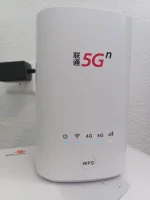
Share ko lang po experience ko sa pag downgrade at unlock ng superuser at root user ng modem na to.
First download these files:
ADB Tools
Download
Firmwares
Download
Other Firmwares
You do not have permission to view the full content of this post. Log in or register now.
You do not have permission to view the full content of this post. Log in or register now.
Sunod na gagawin naten unlock ang root para makapag downgrade:
1. Login to 192.168.0.1 using user:admin password:admin
2.press f12 then click console
3.type
4.Go to management then change usernamePage.level=1
5. select administrator user
6.reset new name = root Duplicate New Username: = root
7.go change password, click administrator user
8. ikaw na bahala kung ano ilagay mo pw
Credits kay Gonfreecs600
After neto logout tayo then login as root tas gawin ulit yung steps 2 & 3
9. Go to management > System upgrade > Browse > (Insert firmware) > upload > Sytem upgrade
*uulit ulitin naten ang step 9 hnggng maging 1.10.23 software version naten
Ganto ang pasunod sunod sa pag downgrade
1.14.0 >>>> 1.13.0 >>>> 1.10.23
Pag successful lahat yung pag flash pwede na tayo mag proceed sa pag enable ng ADB
10. Login to 192.168.0.1 using root
11.press f12 then click console
12.type
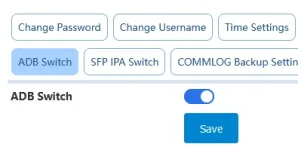
13. Go to management > ADB Switch then enable (dapat naka blue na switch icon sya)Page.level=1
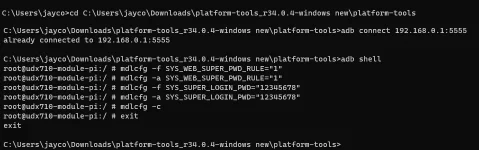
14. Open CMD then cd to the directory ng ADB tools, for example: nasa C:/ yung adb tools ko, ganto itype ko
cd C:/platform-tools_r34.0.3-windows
adb connect 192.168.0.1:5555
adb shell
mdlcfg -f SYS_WEB_SUPER_PWD_RULE="1"
mdlcfg -a SYS_WEB_SUPER_PWD_RULE="1"
mdlcfg -f SYS_SUPER_LOGIN_PWD="12345678"
mdlcfg -a SYS_SUPER_LOGIN_PWD="12345678"
mdlcfg -c
exit
Credits to sir
Lagay nyo imei ng unit nyo kung malapit kayo sa modem nyo nasa ilalim sa sticker may imei yan
16. Click generate, save yung mga details (username & password)
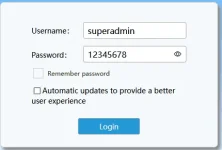
17. Go to 192.168.0.1 then input yung username (dalawa yun either "superadmin" or yung alternate username na "Gztz@83583#" without quotes)
18. Input password 12345678
19. Dapat naka login na kayo as superuser
(Optional)20.For IMEI changing, Go to Management > AT Command then input code:
AT+SPIMEI=0, "IMEI CODE HERE"
AT+SPIMEI?
21. Then go to Management > System Upgrade > Upgrade kayo to 1.15.1 para mas stable ang unit nyo
Wag iupdate sa 1.16 kasi may nabasa ako na mawawala nanaman yung superuser. Pwede nyo itry kung gusto nyo walang sisihan pag nawala ulit or try nyo downgrade nanaman. hehehe
Yun lang. At sana may matulungan ako. Feel free to post dito kung may mga na encounter na problems along the way.