PH
PHLeagueOfKappa
Eternal Poster
SPOTIFY PREMIUM
NO ADS
Spicetify is a multiplatform command-line tool to customize the official Spotify client.
Installation
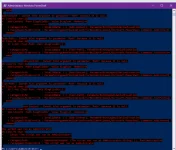
iwr -useb You do not have permission to view the full content of this post. Log in or register now. | iex
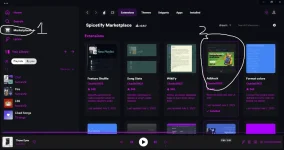
Also run the following if you would like to install the You do not have permission to view the full content of this post. Log in or register now., which gives you access to a tab in Spotify's sidebar that allows you to search for and install themes, extensions, and snippets.
iwr -useb You do not have permission to view the full content of this post. Log in or register now. | iex
curl -fsSL You do not have permission to view the full content of this post. Log in or register now. | sh
Spicetify Marketplace
curl -fsSL You do not have permission to view the full content of this post. Log in or register now. | sh
However, the update might have major changes to the client, which means you will need to run spicetify upgrade every time you update Spotify. If no update for Spicetify is available, it means that it either still works by simply running spicetify backup apply, or that we are still working on updating Spicetify to work on the new version.
After running spicetify upgrade, you will be prompted to run spicetify restore backup apply to have everything back where it was.
For more info
You do not have permission to view the full content of this post. Log in or register now.
NO ADS
Spicetify is a multiplatform command-line tool to customize the official Spotify client.
Installation
Windows
This is the installation method what we recommend for most users. It is the fastest and most reliable way to install Spicetify.Powershell (pre-built binary)
Copy paste this code to Powershelliwr -useb You do not have permission to view the full content of this post. Log in or register now. | iex
Also run the following if you would like to install the You do not have permission to view the full content of this post. Log in or register now., which gives you access to a tab in Spotify's sidebar that allows you to search for and install themes, extensions, and snippets.
iwr -useb You do not have permission to view the full content of this post. Log in or register now. | iex
Linux and MacOS
Shell (pre-built binary)
Spicetify CLIcurl -fsSL You do not have permission to view the full content of this post. Log in or register now. | sh
Spicetify Marketplace
curl -fsSL You do not have permission to view the full content of this post. Log in or register now. | sh
Basic Usage
After installing Spicetify and Spicetify's Marketplace, you can use it to customize your Spotify client using all the available extensions and themes found in the Marketplace.Updating
Spotify, every now and then, updates its client. Since we have no power over this process, you will likely need to re-apply Spicetify.However, the update might have major changes to the client, which means you will need to run spicetify upgrade every time you update Spotify. If no update for Spicetify is available, it means that it either still works by simply running spicetify backup apply, or that we are still working on updating Spicetify to work on the new version.
After running spicetify upgrade, you will be prompted to run spicetify restore backup apply to have everything back where it was.
For more info
You do not have permission to view the full content of this post. Log in or register now.