 PH
PHCreating this thread hope makatulong sa mga nahihirapan mag logout ng kanilang FB or messenger account from the Android device.
Let's start by just following the photo tutorial below.
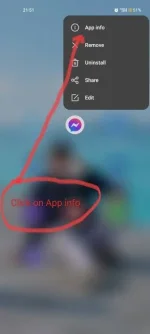
Step 1. You need to look for your messenger and long press on it.
Step 2. Click on the App info
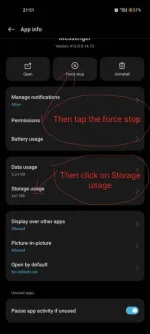
Step 3. Click Force stop
Step 4. Click on Storage usage
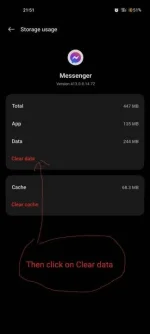
Step 5. Click on Clear data
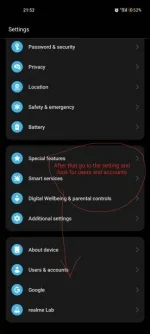
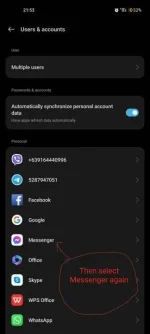
Step 6. Go to settings and look for Users and Accounts
Step 7. Select Messenger or FB
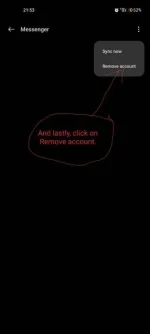
Step 8. In the final step click on Remove account
Now, Congrats! worries no more back to messenger wala na ang account mo.
Thanks. hope you enjoy.
Let's start by just following the photo tutorial below.
Step 1. You need to look for your messenger and long press on it.
Step 2. Click on the App info
Step 3. Click Force stop
Step 4. Click on Storage usage
Step 5. Click on Clear data
Step 6. Go to settings and look for Users and Accounts
Step 7. Select Messenger or FB
Step 8. In the final step click on Remove account
Now, Congrats! worries no more back to messenger wala na ang account mo.
Thanks. hope you enjoy.

