PH
PHT A Y L O R _ 1 3
Forum Master
Description: Macrium Reflect – backup and recovery for individual PCs and servers. Reflect Workstation – Designed for endpoint backup of business-critical PCs and workstations. Peace of mind for organisations when backing up Windows PCs.
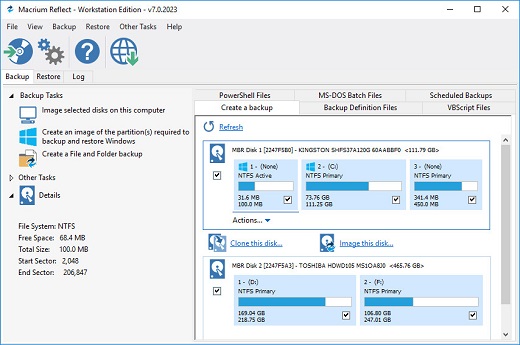
Solution highlights:
- New Backup Engine: Incremental and differential images up to 60 times faster
- Instant virtual booting of backup images: instantly create, start and manage Microsoft Hyper-V virtual machines
- Ultra-fast Live imaging of windows systems, physical and virtual
- Restore images to dissimilar hardware using Macrium ReDeploy
- Greatly simplified administration including pre-defined Backup Plans for popular backup strategies
- Fully featured file and folder level backup and recovery
- Updated support for all the latest Windows Operating Systems and disk formats
- Backup your entire PC to a single compressed image file.
- Backup files and folders to a single compressed archive file.
- Recover partitions and entire disk images with just a few clicks of your mouse
- Dynamic disk support
- MBR and GPT disk support
- Restore images to dissimilar hardware using Macrium ReDeploy
How To Install?
- Install the program from the given setup. (Select your preffered version)
- Don’t run the application yet and close from system tray or task manager if running.
- Extract the “ρá†ch Fix.zip” to installed directory location.
- Run the ρá†ch as admin and apply it.
- Boom! Now you can use the program without any interruptions.
- That’s it, Enjoy now.
You do not have permission to view the full content of this post. Log in or register now.