 PH
PHPHC- Naksu
Elite
For Windows 11 users who didn't like the new menu context menu (right button mouse list)
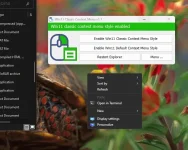
A small tool with a size of less than 1 mega allows you to switch from the new menu to the old one and vice versa with the click of a button.
1- Download the compressed file.
2- Release the Pressure
3- open the exe file
4- You will find two options
First choice to do the ol classic menu
The second option by doing the new Windows 11 menu.
After you switch then Restart Explorer
You do not have permission to view the full content of this post. Log in or register now.
No Pass
A small tool with a size of less than 1 mega allows you to switch from the new menu to the old one and vice versa with the click of a button.
1- Download the compressed file.
2- Release the Pressure
3- open the exe file
4- You will find two options
First choice to do the ol classic menu
The second option by doing the new Windows 11 menu.
After you switch then Restart Explorer
You do not have permission to view the full content of this post. Log in or register now.
No Pass
