 PH
PH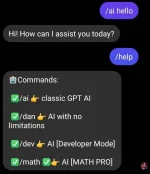
Requirements:
- FB/meta developer account
- vps/virtual machine
- ssl
- domain
- nodejs
To Do's;
- Get your domain, set up ssl CSR etc. Namecheap already has a guide for you to understand.
- Create meta developer account create app and choose messenger under products.
- Setup SSLYou do not have permission to view the full content of this post. Log in or register now. along with your webhook. Namecheap SSL tutorial You do not have permission to view the full content of this post. Log in or register now..
- Download your ssl (ZIP contains 3 files)
Instructions:
I suggest setting up on IDE's. Eg. (sublime, vscode, etc.)
Set up your ssl by copy and paste the 3 files inside the folder keys.
rename also accordingly under server.js

upload your finished setup to your vps/vm
npm install --g yarn
yarn install
after you finished setting up: yarn start
Test your webhook: meta You do not have permission to view the full content of this post. Log in or register now..
IF YOUR DOMAIN AND SSL HAVE FINISHED SETUP
On your meta developer account app under products>messenger
Webhook url: yourdomain.com/webhook
When applying for a webhook URL for Messenger, please remember to set a verify_token. After setting the verify_token, make sure to copy and paste it under the webhook URL.
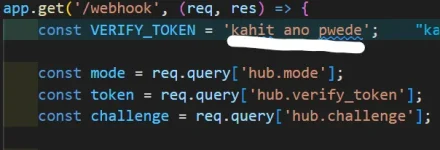
Copy also your Facebook page access token and paste it on configs/configs.json "accessToken"
To ensure your page can respond to everyone, it is necessary to request an app review for advanced access to pages_messaging.
"This isn't a full tutorial; you can ask ᑕᕼᗩTGᑭT or search on Google if you encounter any roadblocks."
--s u f f 3 r--
+-+-+-+-+-+-+-+
"Believe you can and you're halfway there." - Theodore Roosevelt
