 PH
PHFreeNetNeed
Elite
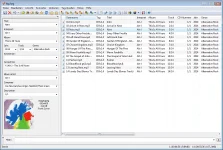
MP3TAG
The universal tag editor and more ...
Mp3tag is a powerful and easy-to-use tool to edit metadata of audio files.
It supports batch tag-editing of ID3v1, ID3v2.3, ID3v2.4, iTunes MP4, WMA, Vorbis Comments and APE Tags for multiple files at once covering a variety of You do not have permission to view the full content of this post. Log in or register now..
Furthermore, it supports online database lookups from, e.g., Amazon, discogs, MusicBrainz or freedb, allowing you to automatically gather proper tags and download cover art for your music library.
You can rename files based on the tag information, replace characters or words in tags and filenames, import/export tag information, create playlists and You do not have permission to view the full content of this post. Log in or register now..
Main features:
Batch Tag Editing Write ID3v1.1, ID3v2.3, ID3v2.4, MP4, WMA, APEv2 Tags and Vorbis Comments to multiple files at once.
Support for Cover Art Download and add album covers to your files and make your library even more shiny.
Import from Amazon, discogs, freedb, MusicBrainz Save typing and import tags from online databases like Amazon, discogs, freedb, MusicBrainz, and more.
Replace characters or words Replace strings in tags and filenames (with support for Regular E×ρréššions).
Create Playlists automatically Create and manage playlists automatically while editing.
Rename files from tags Rename files based on the tag information and import tags from filenames.
Export to HTML, RTF, CSV Generate nice reports and lists of your collection based on user-defined templates.
Full Unicode Support User-interface and tagging are fully Unicode compliant.
Besides these main features Mp3tag offers a variety of other functions and features ranging ranging from batch export of embedded album covers, over support for iTunes-specific tags like media type or TV Show settings, to combining multiple actions into groups that can be applied with a single mouse click.
Supported Audio Formats
- Advanced Audio Coding (You do not have permission to view the full content of this post. Log in or register now.)
- Apple Lossless Audio Codec (You do not have permission to view the full content of this post. Log in or register now.)
- Audio Interchange File Format (You do not have permission to view the full content of this post. Log in or register now.)
- Direct Stream Digital Audio (You do not have permission to view the full content of this post. Log in or register now.)
- Free Lossless Audio Codec (You do not have permission to view the full content of this post. Log in or register now.)
- Monkey's Audio (You do not have permission to view the full content of this post. Log in or register now.)
- Mpeg Layer 3 (You do not have permission to view the full content of this post. Log in or register now.)
- MPEG-4 (You do not have permission to view the full content of this post. Log in or register now.)
- Musepack (You do not have permission to view the full content of this post. Log in or register now.)
- Ogg Vorbis (You do not have permission to view the full content of this post. Log in or register now.)
- IETF Opus (You do not have permission to view the full content of this post. Log in or register now.)
- OptimFROG (You do not have permission to view the full content of this post. Log in or register now.)
- Speex (You do not have permission to view the full content of this post. Log in or register now.)
- Tom's Audio Kompressor (You do not have permission to view the full content of this post. Log in or register now.)
- True Audio (You do not have permission to view the full content of this post. Log in or register now.)
- Windows Media Audio (You do not have permission to view the full content of this post. Log in or register now.)
- WavPack (You do not have permission to view the full content of this post. Log in or register now.)
- WAV (You do not have permission to view the full content of this post. Log in or register now.)
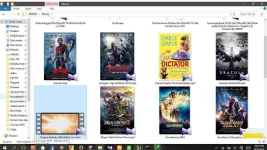
Ito gamit ko para my cover ang .mp4 format na mga vidoes para madali matukoy kung ano ang palabas. Kung napapansin niyo mga repairshops sa loob ng malls my mga cover ang pelikula nilang na dl sa idm a torrents na binebenta.
practical use ko for movies at anime covers para alam ko kung anung anime na dl ko.
