PH
PHArasakaEmployee
Fanatic
Kung meron na nito or wrong section, padelete nalang po or pa move ng thread mga master. Salamat!
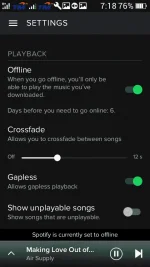
Take advantage of the 7 Days Premium offer of Spotify by freezing the time on Spotify App itself. Gumamit ako ng Xposed Module, "Per App häçking", para mapatigil yung oras nung Spotify. Di ko na ipoprovide yung app dito kase nakukuha naman sya sa Xposed Repo. Pakisundan nalang yung instructions.
1. Search Per App häçking on Xposed.
2. Install Per App häçking.
3. Activate the app and reboot.
4. After reboot, open Per App häçking.
5. Search Spotify on search bar sa app.
6. Select Spotify
7. Select Time Machine.
8. Input "2015-09-09 02:02"
9. Select OK.
10. Buksan ang Spotify, i-check kung gumana at madami nang days.
11. Enjoy Premium!
Dahil dito, di ko na kailangan baguhin yung Date ng phone ko mismo para lang madagdagan yung days ng Premium ko, so yan. Feedback nalang kayo. Hit thanks!
Update: NOT WORKING na mga bes
Take advantage of the 7 Days Premium offer of Spotify by freezing the time on Spotify App itself. Gumamit ako ng Xposed Module, "Per App häçking", para mapatigil yung oras nung Spotify. Di ko na ipoprovide yung app dito kase nakukuha naman sya sa Xposed Repo. Pakisundan nalang yung instructions.
1. Search Per App häçking on Xposed.
2. Install Per App häçking.
3. Activate the app and reboot.
4. After reboot, open Per App häçking.
5. Search Spotify on search bar sa app.
6. Select Spotify
7. Select Time Machine.
8. Input "2015-09-09 02:02"
9. Select OK.
10. Buksan ang Spotify, i-check kung gumana at madami nang days.
11. Enjoy Premium!
Dahil dito, di ko na kailangan baguhin yung Date ng phone ko mismo para lang madagdagan yung days ng Premium ko, so yan. Feedback nalang kayo. Hit thanks!
Update: NOT WORKING na mga bes