 PH
PHmmutia121928
Elite

Adobe Lightroom Classic is a powerful software application designed for professional photographers and enthusiasts who want to organize, edit, and enhance their digital images. It is a part of the Adobe Creative Cloud Photography plan, which includes Photoshop, Lightroom, and other applications. In this article, we will explore the key features of Adobe Lightroom Classic and how it can help you take your photography skills to the next level.
What is Adobe Lightroom Classic?
Adobe Lightroom Classic is a desktop-based photo management and editing application that allows you to organize your digital photos, create photo books, slideshows, and web galleries, and apply a wide range of editing tools and presets to enhance your images. It was first introduced in 2007 and has since become one of the most popular software applications among professional photographers.Key Features of Adobe Photoshop Lightroom Classic
Here are some of the key features of Adobe Photoshop Lightroom Classic that make it a powerful tool for managing and editing your digital images:Library Module
The Library module is where you import, organize, and manage your photos. You can sort your photos by date, keyword, rating, and other criteria, and add metadata such as copyright information, GPS coordinates, and captions. The Library module also allows you to create collections, smart collections, and virtual copies of your photos.
Develop Module
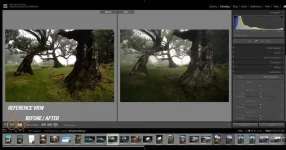
The Develop module is where you can make adjustments to your photos, such as exposure, contrast, white balance, and color correction. You can also apply a wide range of presets and filters to your images and use the graduated filter, radial filter, and adjustment brush to make localized adjustments.
Map Module
The Map module allows you to view and organize your photos based on their geographic location. You can use GPS data from your camera or smartphone to automatically add location information to your photos, and search for photos based on location using the map interface.
Book Module
The Book module allows you to create photo books and other printed materials using your photos. You can choose from a variety of book layouts and styles, and customize the design and content to create a unique and personalized product.
Slideshow Module
The Slideshow module allows you to create dynamic slideshows of your photos, complete with music, captions, and other effects. You can choose from a variety of templates and customize the slideshow to fit your specific needs.
Print Module
The Print module allows you to print your photos on a variety of paper sizes and layouts, including contact sheets, picture packages, and custom layouts. You can also add watermarks and other information to your prints.
Web Module
The Web module allows you to create web galleries of your photos, which you can share online with friends, family, and clients. You can choose from a variety of templates and customize the design and content to fit your needs.
Why Use Adobe Lightroom Classic?
There are several reasons why you might want to use Adobe Lightroom Classic for your photography needs:Professional Quality
Adobe Lightroom Classic is designed for professional photographers who demand high-quality results. The editing tools and presets are designed to produce stunning images that stand out from the crowd.
Efficiency
Adobe Lightroom Classic is a powerful tool for managing large collections of photos. The Library module allows you to easily organize and sort your photos, while the Develop module allows you to make quick and efficient edits to your images.
Integration with Photoshop
Adobe Lightroom Classic is fully integrated with Photoshop, which allows you to seamlessly move between the two applications to perform more advanced editing tasks. You can also use Photoshop plugins and actions within Lightroom to further enhance your images.
Non-Destructive Editing
One of the key benefits of using Adobe Lightroom Classic is that it uses a non-destructive editing workflow. This means that your original image file remains untouched, and any changes you make are saved as metadata. You can always go back and undo any changes you’ve made, or create virtual copies of your photos to try out different edits.
Cloud Storage
Adobe Lightroom Classic also offers cloud storage options through the Adobe Creative Cloud. This allows you to access your photos from anywhere, and sync changes between multiple devices. You can also use Lightroom mobile to edit your photos on-the-go, and then sync the changes back to your desktop catalog.
Conclusion
Adobe Lightroom Classic is an incredibly powerful tool for managing, editing, and enhancing your photos. With its intuitive interface, a wide range of features, and seamless integration with other Adobe applications, it’s no wonder that Lightroom has become the go-to choice for photographers of all skill levels.Whether you’re a professional photographer looking to streamline your workflow, or a hobbyist looking to take your photos to the next level, Adobe Lightroom Classic is an essential tool to have in your toolkit.

System Requirements
Processor: Intel® or AMD processor with 64-bit supportOperating System: Windows 10 (64-bit) version 1809 or later
RAM: 4 GB (Recommended 12 GB or more)
GPU: See Photoshop Graphics Processor (GPU) Card FAQ
Resolution: 1280 x 800 (Recommended 1920 x 1080)
Hard disk space: 2 GB of available hard disk space
ATTENTION!!! For successful activation, it is recommended to turn off the antivirus.

You do not have permission to view the full content of this post. Log in or register now.

