 PH
PH
Overview of WinToHDD
WinToHDD is a free software application designed to help users install, reinstall, or clone Windows on their devices without using a CD/DVD or USB drive. It’s an excellent alternative to traditional installation methods and offers many benefits to users, including time and cost savings, convenience, and ease of use.Key Features of WinToHDD
Offers several key features that make it a popular choice among users. Some of these features include:- Easy-to-use interface: It has a user-friendly interface that simplifies the installation process and makes it accessible to users with different skill levels.
- One-click installation: You can install, reinstall, or clone Windows with just one click.
- Clone system: You can clone the existing Windows operating system to a new drive, which is a useful feature when upgrading to a larger hard drive or SSD.
- Install Windows on a different device: This enables you to install Windows on a different device without having to use a CD/DVD or USB drive.
- Offline installation: Supports offline installation of Windows, making it possible to install Windows even without an internet connection.
- our computer.
Conclusion
WinToHDD is an excellent software solution for anyone looking to install, reinstall, or clone Windows on their device without using a CD/DVD or USB drive. It’s easy to use, saves time and cost, and offers several benefits to users. Whether you’re upgrading to a larger hard drive or SSD, or installing Windows on a different device, it is an excellent choice.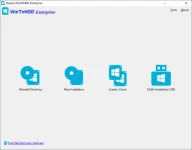
System Requirements
Supported operating systems: Windows Vista/2008 or later (32/64-bit)
CPU: Intel® Pentium® processor 1GHz (32 bits or 64 bits) or above
RAM: 1 GB (2 GB Recommended)
Disk Space: 1024 MB and above free space
CPU: Intel® Pentium® processor 1GHz (32 bits or 64 bits) or above
RAM: 1 GB (2 GB Recommended)
Disk Space: 1024 MB and above free space
Software: WinToHDD Enterprise
Language: Multilingual
Developer: You do not have permission to view the full content of this post. Log in or register now.
Medicine: Pre_Activated
You do not have permission to view the full content of this post. Log in or register now.
Language: Multilingual
Developer: You do not have permission to view the full content of this post. Log in or register now.
Medicine: Pre_Activated
You do not have permission to view the full content of this post. Log in or register now.